NetSuite integration case study

Eliminating Approval Bottlenecks with a NetSuite Slack Integration

A multi-entity real estate and property management group in the GCC region was losing days to purchase approvals stuck in email while their NetSuite workflow ran exactly as configured. ERP Peers brought the approval action into Slack while keeping NetSuite as the single source of truth.

IndustryReal estate & property
RegionGCC
SystemsNetSuite + Slack
Entities3 subsidiaries
Reported outcomes
From the client's own procurement and finance data after go-live
70%Reduction in average purchase requisition approval timeAcross all three entities
3 DaysNew average approval cycleDown from nearly 14 business days before the integration
ZeroMissed approvals from notification failureSince go-live

Client context

A Property Group Running NetSuite Across Three Subsidiaries

The client is a well-established real estate and property management group operating across the Gulf region, with teams covering engineering, facilities, procurement and finance spread across multiple offices. They had invested in Oracle NetSuite as their centralised ERP and had been running it for several years across three subsidiaries before approaching ERP Peers.

Their NetSuite environment was mature: purchase requisition workflows were in place, cost centres were mapped, approval hierarchies were configured, and multi-currency support was active across all three entities. On paper, the setup was solid. In practice, the procurement process was grinding—requisitions sat open for days while the business waited for approvals that should have taken minutes, vendors missed delivery windows, and finance could not close periods cleanly because uncommitted spend was distorting their reporting.

The client came to ERP Peers not looking to redesign their process. They wanted to know why a properly configured system was producing this outcome, and what could be done about it without disrupting the workflows they had spent years building.

The challenge

The Workflow Was Right. The Problem Was Reaching the Approvers.

When ERP Peers carried out the initial discovery, the diagnosis was clear within the first session: the NetSuite workflow was functioning exactly as designed. Requisitions were routing correctly, approval chains were triggering, and email notifications were going out. The issue was on the receiving end—the people responsible for approving purchase requisitions were not living in NetSuite. They were in Slack, in meetings, or in the field.

01

Email Notifications Going Unread

NetSuite was sending approval request emails correctly, but approvers were not treating them with urgency. Emails were filtered, missed, or left for later, with no escalation mechanism and no way for procurement to know a notification had gone unactioned until they chased it manually.
02

Approvers Were Not in NetSuite Day-to-Day

Department heads and senior managers across engineering, facilities and finance were working primarily in Slack and email. NetSuite was a system they visited at period end, not one they checked daily—the approval queue was out of sight and therefore out of mind.

03

No Structured Escalation Path

When a requisition sat open for more than a day, procurement had no formal way to escalate. Follow-up was happening through personal messaging apps and phone calls, none of which were tracked and none of which fed back into NetSuite.

Diagnostic insight

Asking approvers to open a browser, log into an ERP, navigate to a queue and action a record was too many steps for a task expected to happen quickly and frequently. The workflow logic was not the problem—the approval action was separated from the environment approvers actually worked in.

The solution in practice

Bringing the Approval Into Slack, Without Moving Anything Out of NetSuite

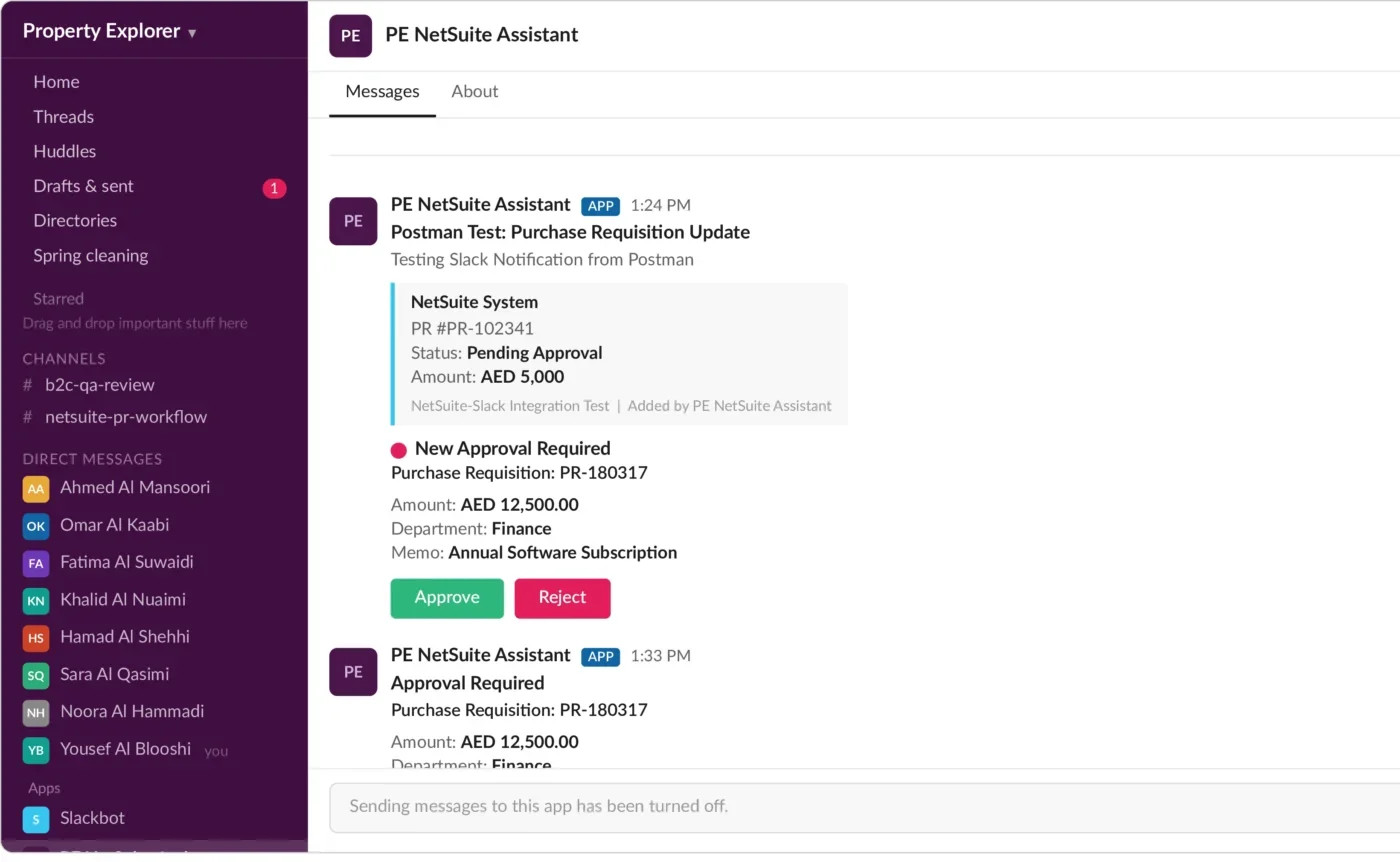
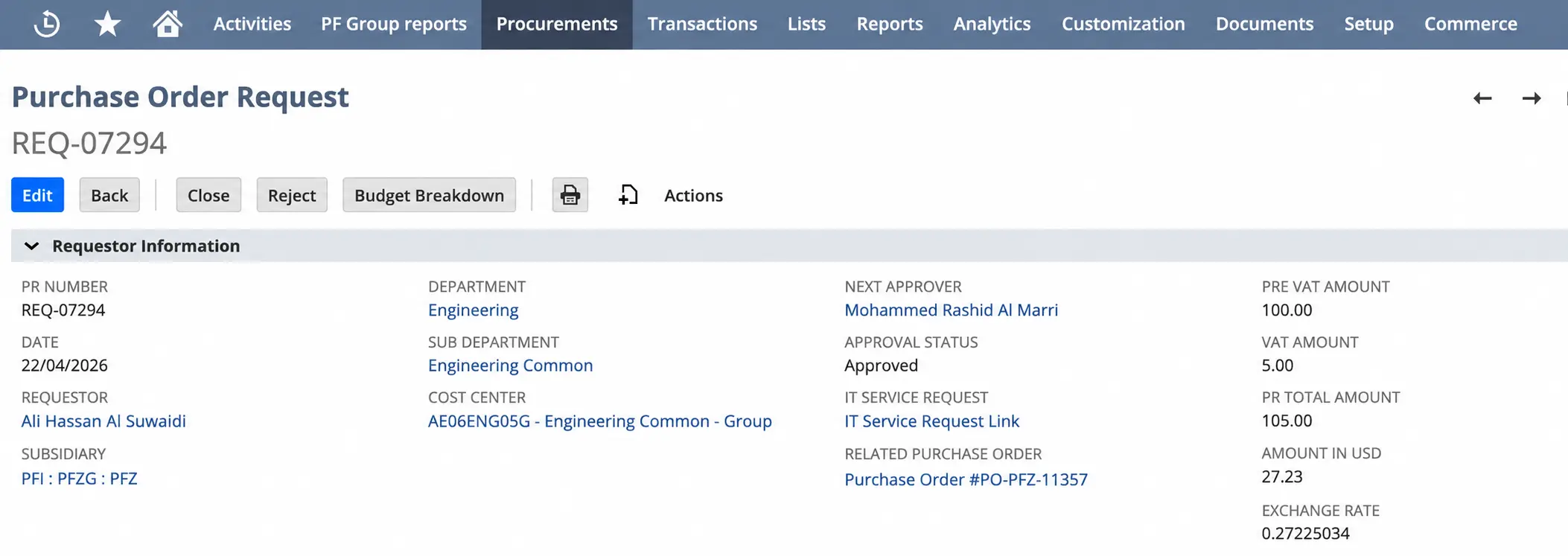
ERP Peers built a custom two-way integration that presents the relevant purchase requisition context directly in Slack and returns the approver’s decision to the existing NetSuite workflow—NetSuite remained the system of record for every transaction throughout.

Outbound Notification

The moment a requisition reaches an approver's step, its context is pushed into Slack—no polling, no separate login.

Inbound Decision Sync

The approver's action in Slack writes back to the same NetSuite record and continues the configured workflow exactly as before.

Multi-Entity Handling

Requisitions from all three subsidiaries route correctly, with entity, cost centre and currency context preserved through the round trip.

Full Audit Trail

Every approval and rejection remains fully recorded inside NetSuite, so the integration adds a faster action surface without weakening auditability.

Approver experience

What the Approver Sees and What Happens Next

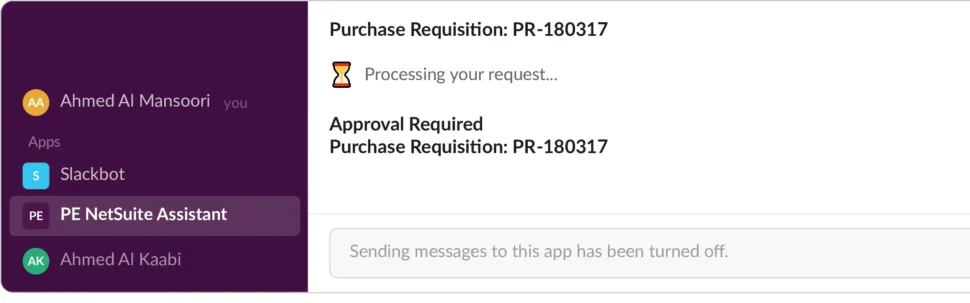
The interaction was designed to remove navigation while preserving the existing approval process in NetSuite.

  1. Receive the requestSlack presents the requisition context to the intended approver the moment it is raised.
  2. Review the informationThe approver sees vendor, amount, cost centre and entity—everything needed for the decision—without opening NetSuite.
  3. Approve or rejectThe action writes back to NetSuite and the existing workflow continues, with the order reaching NetSuite before anyone has to follow up.
Slack purchase requisition approval card connected to NetSuite
Slack approval experienceThe requisition context and decision actions shown to the approver.

Delivery approach

From Discovery to Go-Live in Six Weeks

The integration went live across all three subsidiaries within six weeks of the project starting, moving through discovery, experience design, NetSuite and Slack development, sandbox validation and production enablement.

01

Discover

Map the current approval workflow, entities, fields and stakeholders across all three subsidiaries.

02

Design

Define the Slack experience, routing and the requisition fields each approver needs to see.

03

Build

Configure the Slack application and the NetSuite integration behaviour, including multi-entity routing.

04

Validate

Test approval, rejection, resubmission and multi-entity scenarios in a NetSuite sandbox before go-live.

05

Enable

Deploy to production, brief approvers, train the administrator and monitor the first weeks of live use.

Measurable, sustained impact

What Made This Work, and the Impact Across All Three Entities

Within the first full month of operation, the impact was consistent and clear. These are not projected numbers—they reflect what the client's procurement and finance teams reported from their own data after go-live.

Client-reported70%

Reduction in average purchase requisition approval time across all three entities.

Client-reported3 Days

New average approval cycle, down from an average of nearly 14 business days before the integration.

Client-reportedZero

Missed approvals attributed to notification failure since go-live—a problem that had previously occurred multiple times per month.

Client-reported100%

Real-time visibility of approval status across all entities, accessible to finance and procurement without querying NetSuite directly.

Beyond the headline figures: the informal approval chasing that had been happening over personal messaging apps stopped entirely. Finance period-end reporting became reliably accurate because the open requisition backlog that had been distorting committed spend figures no longer built up. The client has since extended the same integration approach to expense authorisations, with the same results.

Where this approach applies

Where This Approach Applies in Other NetSuite Environments

The same pattern—bringing the decision to where approvers already work, while keeping NetSuite authoritative—applies wherever approval actions involve people who do not work in NetSuite every day.

Vendor Bill Approvals

Present approved invoice context where decision-makers work while retaining the authoritative record in NetSuite.

Expense Report Sign-Off

Reduce navigation for managers while maintaining the configured approval sequence and record ownership.

Contract and Credit Limit Approvals

Bring concise decision context to an approved collaboration surface when ERP queue usage is low.

This pattern may not fit when

Approvals contain information that cannot enter the collaboration platform, the required identity controls cannot be established, decision logic should be redesigned first, or the organisation’s governance requires every action to occur directly within NetSuite.

Facing a similar approval bottleneck?

Have a Similar Challenge in Your Business?

We can assess your current approval workflow, the systems involved and where decisions are actually getting stuck before recommending an integration, workflow change or another route.

Discuss your situation No solution assumed before discovery.

Get In Touch

Our customer support team is available for help.

Let's Talk Business!