Choosing the right business management software is more than a technology decision—it impacts every aspect of operations, from inventory control to financial reporting and customer management. For small and mid-sized businesses, finding a solution that fits both current needs and future growth plans is critical.Fishbowl and NetSuite are two prominent options, yet they serve different types of businesses. Fishbowl is geared toward SMBs looking for strong inventory and manufacturing control, often integrated with QuickBooks. NetSuite is a full cloud-based ERP, offering end-to-end functionality across finance, CRM, eCommerce, and supply chain, ideal for companies scaling rapidly or operating globally.This comparison guide dives into deployment, features, cost, user reviews, and practical guidance to help you determine which system aligns best with your business strategy.Fishbowl Overview
Fishbowl was founded in 2001 and has become a popular choice for small and mid-sized businesses looking to enhance inventory and manufacturing capabilities. It is often used in conjunction with QuickBooks or Xero to overcome the limitations of basic accounting software.
About the Platform:
Fishbowl specializes in inventory management, manufacturing, and warehouse operations. Its features include:- Inventory Management: Track stock levels, automate reordering, and manage multiple warehouses.
- Manufacturing: Bill of materials (BOM), work orders, and production scheduling.
- Order Management: Streamline sales orders, purchase orders, and shipping processes.
- Barcoding & Asset Tracking: Simplifies warehouse operations with barcode scanning and asset management.
Key Strengths:- Integrates seamlessly with QuickBooks and Xero.
- Provides robust inventory control that entry-level accounting software cannot.
- Offers both on-premise and cloud deployment, giving flexibility for different business needs.
- Cost-effective solution for businesses that don’t need a full ERP.
NetSuite Overview
NetSuite was founded in 1998 and acquired by Oracle in 2016. It was one of the first companies to offer a cloud-based ERP solution, making it easier for businesses to manage multiple operations without relying on on-premise software.About the Platform:
NetSuite is a comprehensive cloud ERP system designed for mid-sized to large businesses. It combines multiple business functions into a single system, including:- Financial Management: Accounting, billing, revenue recognition, and financial planning.
- CRM & Sales: Customer relationship management, sales tracking, and marketing automation.
- Inventory & Supply Chain: Real-time inventory tracking, demand planning, and order management.
- eCommerce & Retail: Integrations for online stores and omnichannel operations.
- Human Capital Management: HR, payroll, and employee management.
Key Strengths:- Fully cloud-based, accessible from anywhere.
- Highly scalable for growing businesses.
- Offers extensive customization through SuiteCloud and SuiteApps.
- Strong reporting and analytics capabilities to support strategic decision-making.
Deployment & Cloud Readiness
When evaluating ERP systems, deployment type and cloud readiness are crucial factors. They affect IT overhead, scalability, remote access, and the ability to grow without constantly upgrading infrastructure.Fishbowl
Fishbowl primarily offers on-premise deployment, with optional hosting solutions for cloud access. This approach gives businesses more control over their IT environment, which can be beneficial for companies with existing IT teams or strict data security requirements. However, it also means that updates, maintenance, and backups often require manual management. Fishbowl’s limited cloud capabilities can pose challenges for businesses looking for fully remote or globally accessible solutions.
NetSuite
NetSuite is a 100% cloud-native ERP, delivered as a SaaS solution. This eliminates the need for servers or extensive IT maintenance. Updates and upgrades are automatic, ensuring businesses always run the latest version. Its cloud architecture supports multi-location operations, remote teams, and global expansion with minimal infrastructure investment. Businesses also benefit from built-in disaster recovery, scalability, and secure access from anywhere.
| Aspect | Fishbowl | NetSuite |
|---|
| Deployment Type | On-premise or hosted | Cloud-native SaaS |
| IT Maintenance | Requires internal IT support | Minimal; handled by NetSuite |
| Updates & Upgrades | Manual or semi-automatic | Automatic |
| Scalability | Limited for multi-location | High; supports global growth |
Feature-by-Feature Comparison: Fishbowl vs NetSuite
1. Inventory Management
Fishbowl: Inventory management is the core strength of Fishbowl. It offers robust features such as barcode scanning, lot and serial number tracking, and warehouse management tools. Fishbowl allows businesses to track stock levels in real time, manage multiple warehouses, and streamline order fulfillment. For SMBs with complex inventory needs but without a full ERP, Fishbowl provides highly functional inventory oversight.NetSuite: NetSuite’s inventory management is fully integrated into its ERP system, providing real-time visibility across all locations and departments. Unlike Fishbowl, inventory is linked to financials, procurement, and sales. Automated replenishment, demand planning, and advanced reporting ensure businesses can maintain optimal stock levels and reduce carrying costs. NetSuite is especially advantageous for companies managing multiple warehouses or operating across regions.| Feature | Fishbowl | NetSuite |
|---|
| Stock Tracking | Barcodes, lot, serial numbers, multiple warehouses | Real-time, multi-location tracking, demand planning |
| Integration | Requires QuickBooks or other ERP | Fully integrated with NetSuite ERP |
| Warehouse Management | Basic warehouse management | Advanced warehouse and location mgmt |
2. Manufacturing
Fishbowl: Fishbowl supports manufacturing operations with work order management, bills of materials (BOM), and shop floor tracking. It helps SMBs schedule production, track progress, and manage raw materials. While effective for small and mid-sized manufacturers, Fishbowl may require manual coordination or additional tools for more complex production workflows.NetSuite: NetSuite offers a complete manufacturing solution, including advanced BOM, capacity planning, production scheduling, and costing. Multi-site production, resource allocation, and integrated inventory make it suitable for companies with complex operations or growing global footprints. NetSuite’s manufacturing module is fully integrated with finance and supply chain, enabling real-time cost tracking and operational efficiency.| Feature | Fishbowl | NetSuite |
|---|
| BOM Management | Yes, basic | Multi-level, advanced, supports variants |
| Work Orders | Yes, with shop floor tracking | Yes, with automated scheduling |
| Capacity Planning | Limited | Full-featured, with real-time adjustments |
3. Accounting & Finance
Fishbowl: Fishbowl itself doesn’t have native accounting; it relies on QuickBooks or other ERP systems. This means financial tracking, reporting, and compliance are handled externally. While suitable for SMBs that already use QuickBooks, the lack of built-in accounting limits the system’s ability to provide fully integrated financial insights.NetSuite: NetSuite offers a complete financial management suite, including general ledger, netsuite accounts payable, accounts receivable, financial reporting, multi-entity consolidation and, planning and budgeting. Its accounting is fully integrated with other modules, allowing real-time visibility into revenue, expenses, and inventory value. NetSuite also supports multi-currency transactions and international compliance, making it ideal for businesses with global operations.| Feature | Fishbowl | NetSuite |
|---|
| Accounting Integration | Requires QuickBooks | Native, full ERP accounting |
| Reporting & Analysis | Basic reporting | Advanced, customizable, real-time |
| Multi-Currency Support | Limited | Built-in, with compliance features |
4. CRM & Customer Management
Fishbowl: Fishbowl does not include a native CRM. Businesses must rely on third-party CRM solutions to manage customer data, track sales, and handle support requests. This can add cost and complexity for companies that want a single integrated system.NetSuite: NetSuite’s CRM is fully integrated with its ERP, connecting sales, customer service, and eCommerce. This allows businesses to track opportunities, manage accounts, and monitor customer interactions in real time. The CRM module also provides analytics and dashboards, helping teams make data-driven decisions and enhance customer satisfaction.| Feature | Fishbowl | NetSuite |
|---|
| CRM | Add-on required | Native integration |
| Sales & Support | Limited | Full-featured, integrated dashboards |
| Customer Insights | Minimal | Advanced analytics and reporting |
5. eCommerce & Omnichannel
Fishbowl: Fishbowl supports eCommerce through integrations with platforms like Shopify, WooCommerce, and Amazon. While this enables businesses to sell online, inventory synchronization and order management require careful setup and often manual intervention.NetSuite: NetSuite provides SuiteCommerce, a native eCommerce platform integrated directly with inventory, finance, and CRM. Multi-channel sales, automated order fulfillment, and real-time stock visibility reduce errors and streamline customer experience. This makes NetSuite ideal for businesses pursuing omnichannel growth.| Feature | Fishbowl | NetSuite |
|---|
| eCommerce Integration | Third-party | Native SuiteCommerce |
| Omnichannel Management | Limited | Full-featured, real-time |
| Real-Time Inventory | No | Yes |
6. Integrations & Ecosystem
Fishbowl: Primarily integrates with QuickBooks for accounting. Other integrations, such as CRM or eCommerce platforms (Shopify, WooCommerce, Amazon), require additional setup or third-party tools. While functional, this can increase complexity and costs for businesses needing multiple connected systems.
NetSuite: Offers a comprehensive native ecosystem. Modules for finance, CRM, eCommerce, and inventory are fully integrated. Additionally, NetSuite supports numerous third-party integrations via
SuiteApps or APIs, making it easier for growing businesses to connect other tools without disrupting workflows.
| Feature | Fishbowl | NetSuite |
|---|
| Accounting Integration | QuickBooks required | Native ERP accounting |
| eCommerce / CRM | Third-party add-ons | Native + SuiteApps marketplace |
| API / Third-party support | Limited, manual setup | Extensive API and marketplace support |
7. Scalability & Globalization
Fishbowl: Fishbowl is designed for single-entity SMBs with local or regional operations. Multi-location or international expansion is limited and may require additional integrations or manual processes.NetSuite: NetSuite is built for scalability and global business. It supports multiple entities, currencies, languages, and countries with automated compliance for taxes and reporting. Companies can expand without switching systems, making it a long-term solution for growing businesses.| Feature | Fishbowl | NetSuite |
|---|
| Multi-Entity | Limited | Full support, multi-subsidiary |
| Multi-Currency | Limited | Built-in, with automatic conversion |
| Global Compliance | Minimal | Yes, tax and regulatory compliant |
Cost of Ownership: Fishbowl vs. NetSuite
Understanding the total cost of an ERP includes license fees, subscription costs, user fees, optional modules, and additional integration or implementation expenses.Fishbowl
Fishbowl is generally more affordable upfront. Its pricing includes a subscription or one-time license, with optional hosting fees for cloud access. Most businesses also need QuickBooks for accounting, and may require additional tools for CRM or eCommerce, which can add to the overall cost.Key Pricing Points:
- License or subscription: ~$4,000–$5,000 for basic setup
- Optional cloud hosting: additional recurring fee
- Accounting integration: QuickBooks required
- CRM/eCommerce add-ons: extra cost depending on setup
- Costs increase with number of users, warehouses, and integrations
NetSuite
NetSuite pricing model is subscription-based that includes the base ERP, user fees, and optional modules (finance, CRM, SuiteCommerce, etc.). While the upfront cost is higher than Fishbowl, it provides a full ERP solution with built-in integrations, automatic updates, and cloud hosting.Key Pricing Points:
- Base subscription: starts around $999/month
- Per-user fee: typically $99–$199/month per user
- Optional modules: finance, CRM, eCommerce, manufacturing, etc.
- Implementation/customization: professional services may apply
- Built-in cloud hosting, updates, and integrations reduce need for third-party tools
Pros & Cons of Fishbowl and NetSuite
Evaluating the strengths and weaknesses of Fishbowl and NetSuite helps businesses decide which system aligns with their operational needs, budget, and growth plans.1. Fishbowl Pros and Cons
Pros:- Affordable for SMBs: Lower upfront costs make it accessible for small businesses.
- Strong inventory and manufacturing management: Ideal for companies focused on warehouse control and production tracking.
- QuickBooks-friendly: Seamless integration for accounting purposes.
- Simple deployment for regional operations: On-premise or hosted options provide flexibility.
Cons:- Not a full ERP: Lacks native financial management, CRM, and advanced reporting.
- Limited cloud capabilities: Primarily on-premise; remote access and scalability are restricted.
- Additional integrations required: For CRM, eCommerce, and other operational modules.
- Scaling challenges: Multi-location or international expansion requires manual workarounds or third-party tools.
2. NetSuite Pros and Cons
Pros:- Cloud-native and scalable: Supports global expansion, multi-entity operations, and remote teams.
- All-in-one ERP: Integrated finance, inventory, CRM, eCommerce, and supply chain management.
- Automation and real-time insights: Streamlines processes and provides actionable analytics.
- Low IT overhead: Automatic updates, cloud hosting, and built-in disaster recovery.
Cons:- Higher upfront cost: Subscription fees, per-user pricing, and optional modules can be expensive.
- Longer implementation: Full ERP setup may require professional services and careful planning.
- Complexity for very small businesses: May offer more features than needed for tiny operations.
User Reviews & Feedback
Fishbowl
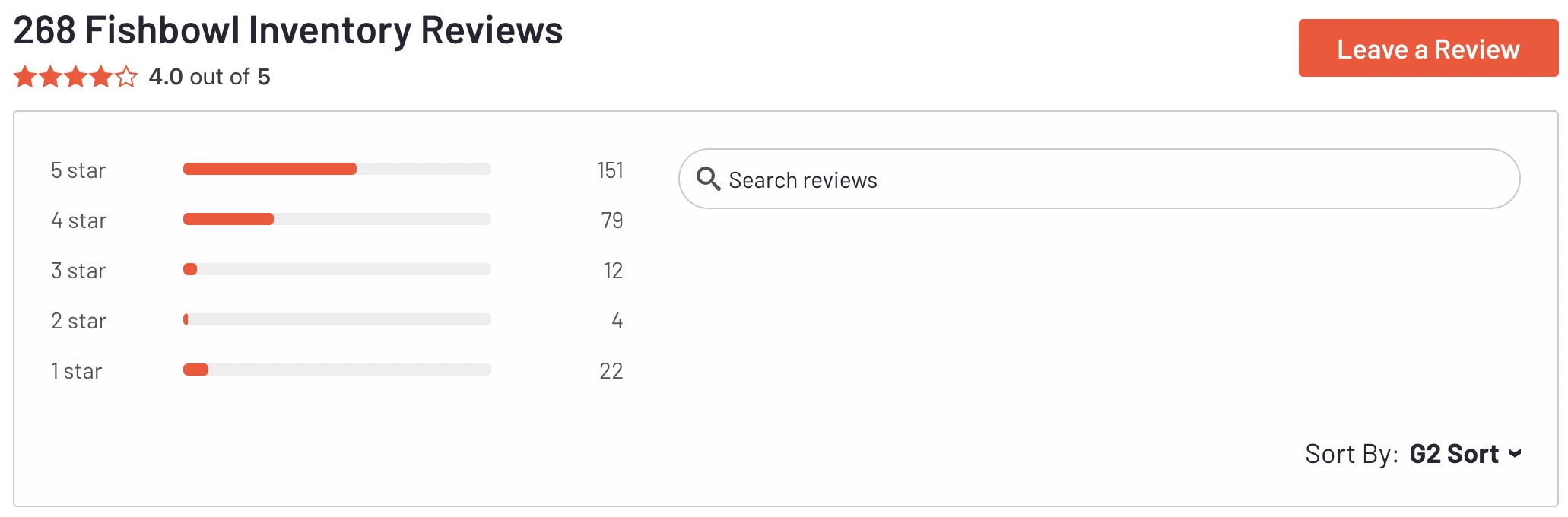
Users praise its inventory management and QuickBooks integration, noting it’s great for SMBs managing stock and manufacturing. Some mention the interface feels outdated and scalability is limited.
 Source: G2 Fishbowl Reviews
NetSuite
Users highlight its all-in-one functionality, customization, and real-time insights. Challenges include higher cost and a steeper learning curve for new users.
Source: G2 NetSuite ReviewsWhich One Should You Choose?
Choosing between Fishbowl and NetSuite depends on your business size, growth plans, and operational complexity:Choose Fishbowl if:- You’re a small to mid-sized business focused on inventory or manufacturing management.
- You already use QuickBooks and want seamless integration.
- You need a lower-cost solution with simpler deployment.
- Your operations are regional or single-entity.
Choose NetSuite if:- You need a full ERP covering finance, CRM, eCommerce, inventory, and supply chain.
- You plan to scale globally or manage multiple entities.
- You want cloud-based, integrated processes with real-time insights.
- You’re ready to invest in long-term scalability and automation.
Conclusion
Choosing the right system between Fishbowl and NetSuite depends on your business needs, budget, and growth strategy. Fishbowl excels at inventory and manufacturing management for SMBs, offering affordability and strong operational control. NetSuite, on the other hand, provides a full cloud-based ERP with integrated finance, CRM, eCommerce, and supply chain management, making it ideal for businesses planning for scalability and global expansion.
By carefully evaluating your current operations, future growth plans, and required functionality, you can select the platform that best supports your business goals and ensures long-term efficiency and growth. 



 Source: G2 Fishbowl Reviews
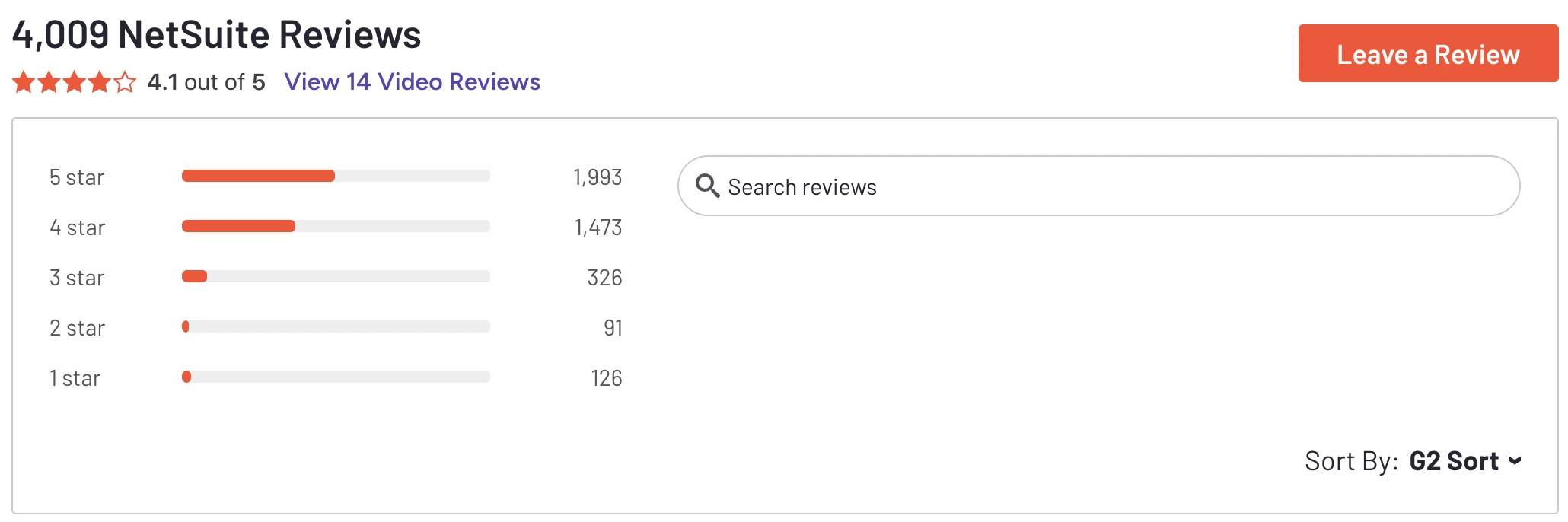 Source: G2 NetSuite Reviews