
Get In Touch
Our customer support team is available for help.
NetSuite Guide

An integration that worked at go-live does not stay working on its own. NetSuite integrations fail quietly more often than they fail loudly, and the gap between when a sync actually breaks and when someone notices is where the real damage happens: duplicate orders, missing invoices, customer records that drift out of sync between systems.
This guide covers the failure patterns that actually show up in NetSuite integrations after go-live, how to tell which one you are dealing with, and where monitoring should sit so the next failure gets caught in minutes, not weeks.
This is a diagnostic guide, not a build guide. If you are still deciding how to build your integration, start with our NetSuite Integration overview instead.
The first diagnostic question is not “what broke.” It’s “did anything tell you it broke.”
Explicit failures throw an error you can see: a failed API call, a Celigo flow marked as errored, a rejected record sitting in an error queue. These are the easier problem, because the system is already telling you something is wrong.
Silent failures are the dangerous ones: a record that syncs successfully but with wrong or incomplete data, a scheduled flow that stops running without alerting anyone, a field mapping that quietly breaks after a NetSuite field is renamed or a picklist value changes. Nothing errors. The integration just stops doing part of its job, and the first sign is usually a business user noticing a number doesn’t match weeks later.
Any integration monitoring approach has to account for both categories separately: an error-queue alert catches the first, but only reconciliation checks and scheduled data-integrity spot checks catch the second.
| Failure category | What it looks like | Typical cause | Silent or explicit |
|---|---|---|---|
| Authentication/token expiry | Integration stops running entirely at a fixed interval | OAuth token or role-based token credential expired or was rotated without updating the integration | Explicit (usually) |
| API governance/rate limits | Calls fail intermittently under load, worse during peak business hours | NetSuite’s governance and concurrency limits reached, especially with high-volume scheduled flows | Explicit |
| Mapping/field drift | Records sync but with missing or wrong values | A NetSuite custom field, saved search, or picklist value changed after the integration was built | Silent |
| Duplicate record creation | The same customer, order, or item appears twice | No defined matching key (email, external ID, tax ID) between systems, or a retry created a second record after a timeout | Silent until reconciliation |
| Ownership/two-way conflict | Two systems both try to be authoritative for the same field | No system-of-record decision made per record type before go-live | Silent, surfaces as data drift |
| Scheduled-flow failure | A flow that used to run stops running | Underlying credential, connection, or platform-side change broke the schedule without an explicit error surfacing to a human | Silent unless monitored |
| Partner/format-specific rejection (EDI-adjacent) | A specific trading partner’s transactions fail while others succeed | See NetSuite EDI Integration; this is EDI-specific and out of scope here | Explicit |
If the sequence above points away from the integration itself — a permission error, a saved search returning unexpected results, or a login problem elsewhere in NetSuite — see our guide to diagnose common NetSuite issues.
A functioning integration monitoring setup needs three layers, not one:
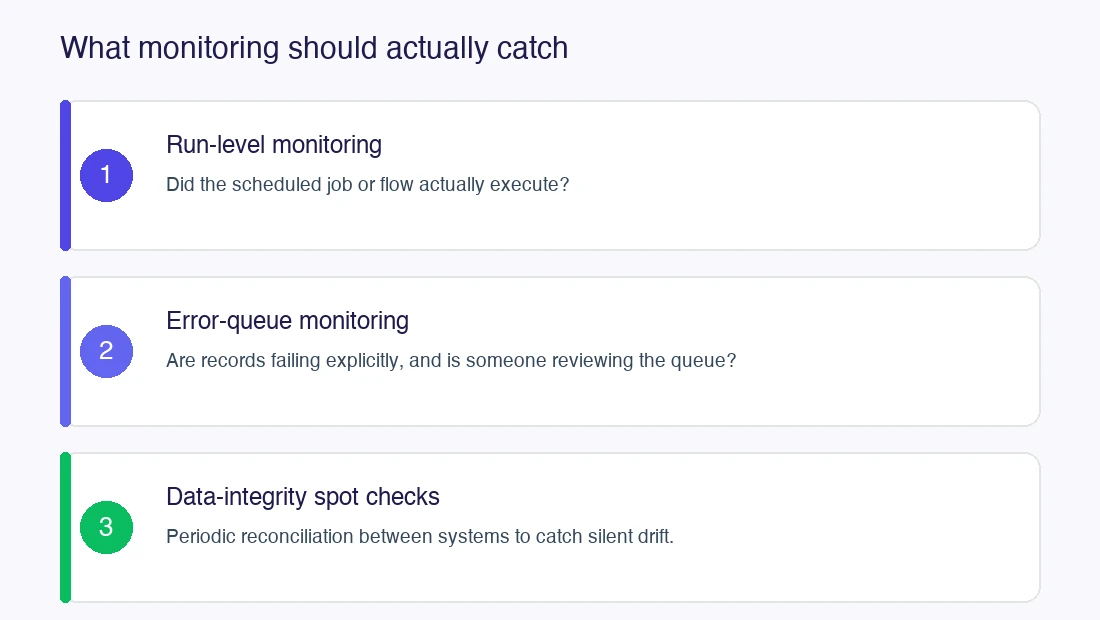
Most integrations that “used to work fine” and then start causing problems are missing the third layer. Explicit error alerts get built; nobody sets up a way to notice that the data itself has quietly drifted.
Some of the above is a five-minute check. Some of it isn’t. It’s worth bringing in outside help when: the failure is recurring and the cause isn’t obvious after the basic sequence above, the integration touches financial data and a silent failure risk is unacceptable, or nobody currently owns monitoring the integration on an ongoing basis. Post-go-live integration issues like these are the kind of work our NetSuite Support and NetSuite Managed Services teams take on.
How do I know if my NetSuite integration is failing silently?
Run a manual reconciliation: compare record counts and a sample of key field values between NetSuite and the connected system for a recent time window. If they match, the integration is likely healthy. If they don’t, and there’s no error queue showing a failure, you have a silent failure.
What’s the difference between a Celigo flow error and a NetSuite-side error?
A Celigo flow error means the integration platform itself flagged a problem, usually visible directly in Celigo’s error queue. A NetSuite-side error (a failed script execution, a governance limit hit, a saved search returning unexpected results) may not surface in Celigo at all if NetSuite accepted the call but processed it incorrectly. Both need to be checked separately.
How often should integration data be reconciled?
This depends on transaction volume and business risk, not a fixed rule. A high-volume order-sync integration justifies more frequent checks than a low-volume, low-risk data sync. The point is that some cadence exists at all; many integrations have none.
Can API governance/rate limit failures be prevented?
Not entirely, but they can be reduced with batching, scheduling flows to avoid peak concurrent usage, and retry/backoff logic instead of immediate re-attempts. Eliminating them completely usually isn’t realistic for high-volume integrations.
Our customer support team is available for help.
Need help with NetSuite?
Chat with our team.