
Get In Touch
Our customer support team is available for help.
NetSuite Integration

NetSuite integration architecture is the set of decisions that determine how every other system in your business connects to NetSuite. Your storefront, your CRM, your warehouse, your bank, your data warehouse. What triggers a sync. What protocol carries the data. What enforces your business rules. What happens when something fails.
Buyers usually start this conversation by naming a product, Celigo, MuleSoft, an API. The right starting point is the decision itself, worked out before any product name enters the conversation.
This guide covers the complete integration landscape a NetSuite buyer actually chooses across, not just the tools one vendor happens to sell. It was researched independently of ERP Peers’ own service list, then, only at the end, mapped to where ERP Peers can genuinely help.
Quick answer: there is no single best NetSuite integration method. The right choice depends on what you are connecting, who owns the data, how much volume moves, and whether a trading partner or compliance rule constrains the protocol. Most real NetSuite environments end up running several integration methods side by side, not one.
Most integration conversations get compressed into a single question: “what should we use to connect X to NetSuite,” as if there were one slot to fill.
In reality, every integration is a stack of separate decisions. Treating them as one decision is where a lot of avoidable rework starts. The next section breaks that stack into its real layers.
Every NetSuite integration, no matter how simple or complex, is made of the same five layers. Naming them separately is what makes the rest of this guide, and any real architecture conversation, make sense.
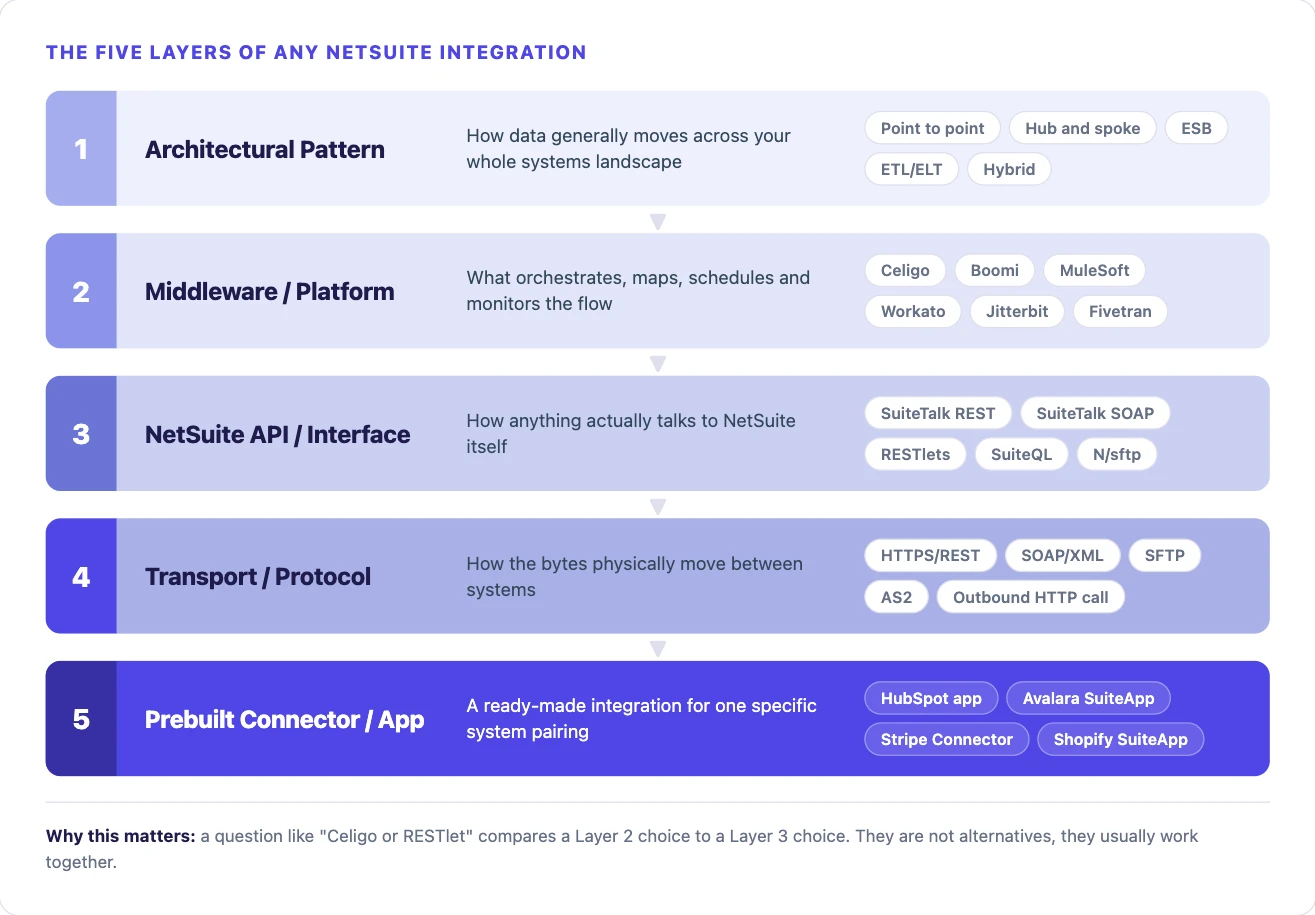
This is also why a question like “Celigo or RESTlet” is not always a fair comparison. Celigo is a middleware/platform choice. A RESTlet is a NetSuite API/interface choice. Celigo’s own NetSuite connector typically calls NetSuite through SuiteTalk REST or a RESTlet under the hood anyway.
The real questions are two separate ones. Do you need a platform to orchestrate multiple systems, monitor flows and manage mappings? That decision sits at the platform layer. Does your NetSuite-side logic need custom SuiteScript validation or workflow triggers that no standard API can express? That decision sits at the API layer, and a RESTlet can sit behind a platform just as easily as behind a direct build.
Whatever platform or pattern you choose, it eventually has to call one of NetSuite’s own native interfaces. There are three, and they are frequently discussed as if they were one thing.
NetSuite’s standard REST API. JSON over HTTPS, ordinary REST conventions (GET to read, POST to create, PATCH to update, DELETE to remove). This is what most platforms and most direct builds call by default, and Oracle’s own guidance points new integrations toward it.
The older, XML based web services API that predates the REST offering. Still present in a lot of existing integrations, still relevant for certain bulk and legacy scenarios. Oracle’s current direction favors REST for new work, so a SOAP-based integration inherited from a previous build is worth flagging for eventual migration rather than treating as a permanent fixture.
Custom SuiteScript exposed as your own endpoint. A RESTlet is the only one of the three that can run arbitrary NetSuite-side logic, custom validation, workflow triggers, business rules, at the moment the integration calls it.
The standard REST API covers most everyday create/read/update/delete needs. A RESTlet fills the gap when the integration needs to do more than move a record.
For bulk reads, especially the kind an ETL/ELT tool or a reporting integration needs, SuiteQL (NetSuite’s SQL-like query interface) and saved searches are usually a better fit than record-by-record REST calls. They can return large, filtered data sets in far fewer round trips.
For file-based exchange, NetSuite offers native SFTP support two ways: the N/sftp SuiteScript module for custom scripted file transfer, and the SFTP Connector SuiteApp for a no-code, configuration-driven setup. Either is the native starting point before reaching for a third-party file-transfer tool.
The pattern to remember: the standard REST API for ordinary record operations, a RESTlet when NetSuite-side business logic must run, SuiteQL or saved searches for bulk reads, and the native SFTP tools for file exchange. Most real integrations use more than one of these together, not just one.
This is the full set of ways buyers actually connect systems to NetSuite. Not every category fits every business. Knowing the full menu first, not the slice one vendor sells, is what makes the rest of this guide useful.
Oracle’s own NetSuite Connector (built from its 2021 FarApp acquisition) provides configuration-driven, prebuilt connectors for major ecommerce platforms, Shopify, BigCommerce, Adobe Commerce, WooCommerce, Amazon, configured largely inside NetSuite itself with minimal coding.
Individual vendors also publish their own native SuiteApps: HubSpot’s app for Contacts, Companies and Deals, the Avalara SuiteApp for tax, the Stripe Connector for payments. Each covers exactly one system pairing well, but only that pairing.
Best for: a single, common system pairing where a vendor-maintained app already exists and covers your actual requirements.
Consider carefully when: your process diverges from the app’s fixed feature set, since native connectors are rigid by design.
Integration Platform as a Service tools sit as a hub between NetSuite and multiple other systems at once. They handle authentication, retry logic, error queues and a visual flow builder, so most of the underlying plumbing does not have to be hand-written.
Celigo is the most NetSuite-specific of these, with more than 80 prebuilt NetSuite connectors. Boomi, Workato and Jitterbit serve the same hub role with a broader, less NetSuite-specific connector library.
Best for: connecting NetSuite to several systems at once through prebuilt or configurable connectors, without a dedicated engineering team maintaining custom code.
Consider carefully when: volume, latency or logic needs exceed what the platform’s connector was built for.
MuleSoft’s Anypoint Platform functions as an enterprise service bus, API-led and capable of orchestrating real-time, batch and event-driven integration patterns across an entire enterprise system estate, not just NetSuite.
It is not NetSuite-specific the way Celigo is. NetSuite connectivity runs through a NetSuite connector inside Anypoint that ultimately calls SuiteTalk or a RESTlet.
Best for: organizations where NetSuite is one system inside a much larger, already-standardized enterprise integration estate, particularly one already built around Salesforce or another MuleSoft-connected platform.
Consider carefully when: used for a single NetSuite-specific need in isolation, where the platform’s overhead outweighs the benefit.
A point-to-point build, custom code on the other system talking directly to NetSuite’s REST API or a RESTlet, with no middleware layer in between.
Full control, no platform licensing cost. But every piece of plumbing a platform would otherwise provide, authentication refresh, retries, monitoring, error queues, becomes something your own team owns and maintains.
Best for: genuinely custom logic, very high volume or tight latency needs, or a system with no mature platform connector where building one from scratch inside a platform would not be materially easier.
Consider carefully when: no internal or partner capacity exists to maintain custom code long term.
Electronic Data Interchange remains the standard for retail and logistics trading-partner compliance. Amazon Vendor Central and large retail partners in particular use structured transaction codes (850 purchase orders, 810 invoices, 856 shipment notices) carried over AS2, SFTP or a Value-Added Network.
AS2 provides digitally-signed delivery receipts. SFTP is the more general secure file-transfer protocol. Both are natively supported in NetSuite through the N/sftp module or the SFTP Connector SuiteApp, or through a dedicated EDI provider layered in front of NetSuite.
Best for: any trading-partner relationship where the transaction format and delivery protocol are a fixed compliance requirement, not a preference.
A common misconception worth correcting directly: NetSuite does not offer native inbound webhooks. What looks like webhook behavior in a NetSuite integration is actually built with a User Event Script, custom SuiteScript that runs when a record is created, updated or deleted and fires an outbound HTTP call to an external system at that moment.
Done well, this gives real near-real-time push behavior, lower overhead than a system polling NetSuite on a timer, and better use of NetSuite’s own governance budget than constant polling would.
Best for: any scenario where an external system needs to know about a NetSuite change immediately, order confirmation, credit hold, fulfillment status, rather than finding out on the next scheduled sync.
A category frequently left out of NetSuite integration conversations entirely, because it is not about operational sync at all.
Tools like Fivetran, Airbyte, Matillion and Stitch extract NetSuite data, often through SuiteAnalytics or SuiteQL, and load it into a data warehouse or lake, Snowflake, BigQuery, Databricks, for BI, reporting and analytics at a scale NetSuite’s own reporting was never meant to carry.
Best for: centralizing NetSuite data alongside other business systems for reporting, analytics or a data science workload.
Consider carefully when: mistaken for an operational two-way sync tool. It is one-directional and analytics-purposed, not a substitute for keeping two live systems in sync.
Most real NetSuite environments end up combining several of the categories above rather than committing to one. An iPaaS for standard connector needs, a RESTlet for NetSuite-side logic that requires it, a dedicated EDI layer for compliance, and a separate ETL pipeline feeding a data warehouse, all touching the same NetSuite instance for different reasons.
Treating this as one platform decision instead of a set of decisions per integration point is the single most common planning mistake covered later in this guide.
The layers model and the method landscape above answer “what exists.” This answers “where do I start for my specific case.”
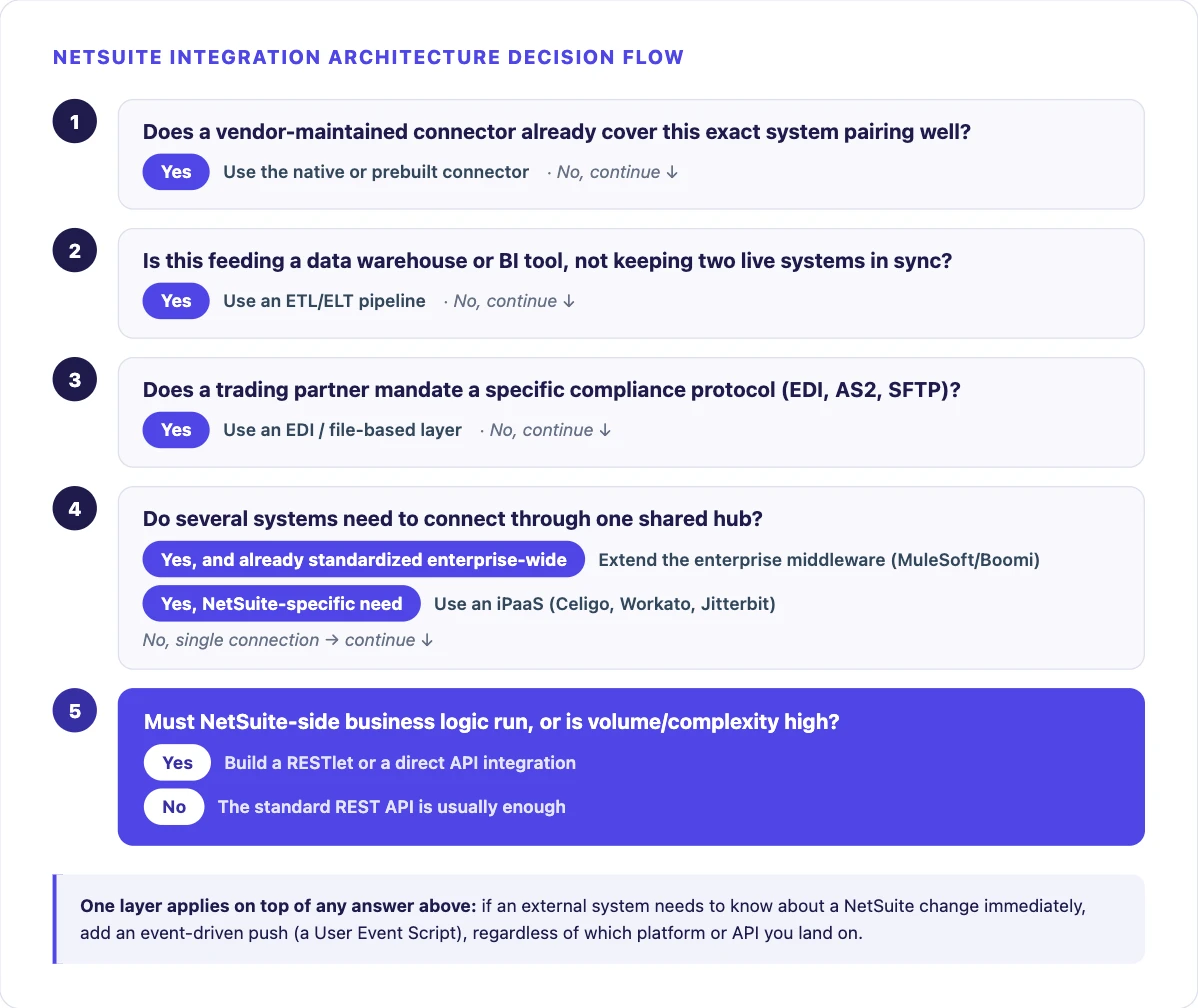
The flow above gets you to a starting point quickly. This table adds the reasoning and the tradeoff behind each one, matched to a starting situation rather than a category name.
| Situation | Usually Start With | Why | Watch For |
|---|---|---|---|
| Standard ecommerce or CRM platform, process matches typical patterns | iPaaS prebuilt connector | Prebuilt mappings already handle the common case | Ongoing platform cost, limited to what the connector supports |
| One specific, common system pairing with a vendor-maintained app | Native/prebuilt connector or SuiteApp | Purpose-built for exactly this pairing | Rigid if your process does not match its assumptions |
| NetSuite-side business rules must be enforced during the integration | RESTlet, often behind a platform | Only a RESTlet can run custom SuiteScript logic | Requires SuiteScript development capacity |
| Highly custom logic or very high transaction volume | Direct API build | No platform ceiling on volume or logic | You own all maintenance and monitoring |
| Already standardized on MuleSoft or Boomi enterprise-wide | Extend the existing enterprise middleware | Consistency with the rest of your integration estate | Higher platform overhead for NetSuite specifically |
| Retail or vendor-compliance trading-partner requirement | EDI over AS2/SFTP | Compliance protocol is fixed by the trading partner | Adds a translation layer to maintain |
| An external system needs to react to NetSuite changes immediately | Event-driven push (User Event Script) | Only a push pattern gives real-time responsiveness | Needs governance-aware retry logic to avoid throttling |
| NetSuite data needs to reach a BI tool or data warehouse | ETL/ELT pipeline | Built for bulk analytical reads, not transactional writes | Not a substitute for operational sync |
| Multiple integration points across the same NetSuite instance | Hybrid, evaluated per connection | No single tool fits every connection equally well | More architecture upfront to avoid under-planning |
Not sure which starting point fits your situation?
We help buyers pick the right approach before any platform is chosen, technology-neutral, based on what you are actually connecting.
A standard order, inventory and customer sync between NetSuite and a platform like Shopify or WooCommerce is one of the strongest fits for a prebuilt iPaaS connector, since order and inventory data typically follows well-established patterns.
Custom pricing rules, unusual fulfillment logic, or marketplace-specific requirements can still need a RESTlet layered on top rather than replacing the standard connector entirely.
Keeping sales, customer and financial data aligned between NetSuite and a CRM like Salesforce or HubSpot needs careful field mapping and conflict resolution, since both systems can independently create or edit the same customer record.
Native connectors, like HubSpot’s own app, cover a useful default field set. Anything beyond it, invoice status, payment history, fulfillment status, usually needs a platform or custom layer added on top, since native connectors are useful but rigid by design.
Connecting NetSuite to a dedicated warehouse management system, whether an in-house WMS or a third-party logistics provider, means keeping inventory levels, order releases, shipment confirmations and fulfillment costs synchronized bidirectionally.
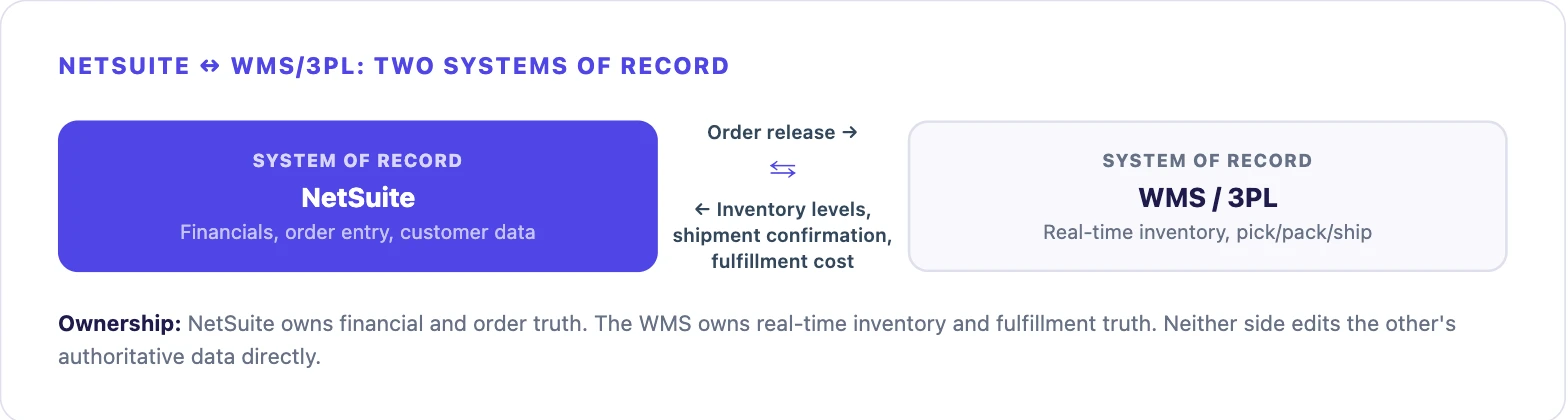
This is a case where sync direction and system-of-record ownership, covered in the next section, matter more than the platform choice itself, since inventory truth has to live in exactly one place.
Amazon Vendor Central and large retail trading partners require specific EDI transaction codes for purchase orders, shipment notices and invoices, with strict compliance requirements around timing and format.
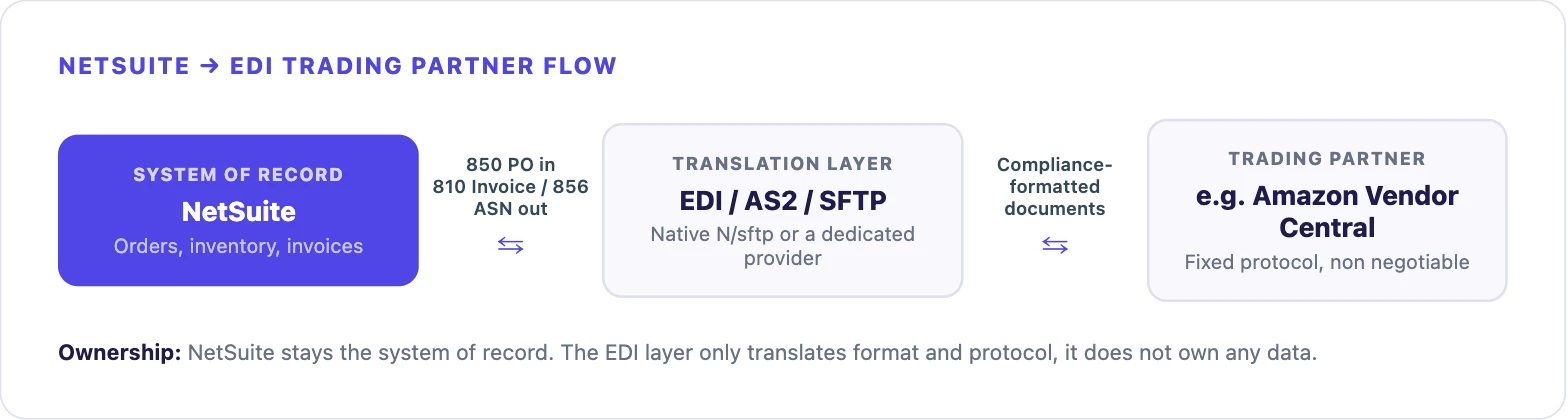
This is the clearest case for a dedicated EDI layer over AS2 or SFTP, rather than forcing a general-purpose connector into a compliance-driven protocol it was not built for. Our own NetSuite and Amazon Vendor Central EDI case study walks through exactly this pattern on a real project.
A finance or operations team that has outgrown NetSuite’s own reporting for cross-system analysis typically pulls NetSuite data into a warehouse like Snowflake or BigQuery via an ELT tool, alongside data from other business systems.
This is a one-directional, read-only flow. It should not be built with the same tool or mindset as an operational two-way sync.
Larger, more complex integration programs spanning multiple NetSuite subsidiaries or regions benefit from a hybrid architecture evaluated per connection. A single platform choice rarely fits every integration point equally well across a genuinely complex environment.
Picking up an integration a previous partner left incomplete, unstable, or built on an aging SOAP connection requires auditing what is already in place first. This is a distinct skill from greenfield architecture work, deciding whether to extend, migrate to REST, or rebuild entirely only comes after that audit.
Before choosing any tool, decide which system owns which piece of data. This single decision prevents more integration problems than any platform choice does.
Every NetSuite integration, regardless of which platform sits on the other side, has to authenticate and operate within NetSuite’s own governance limits. Both are frequently underestimated during initial scoping.
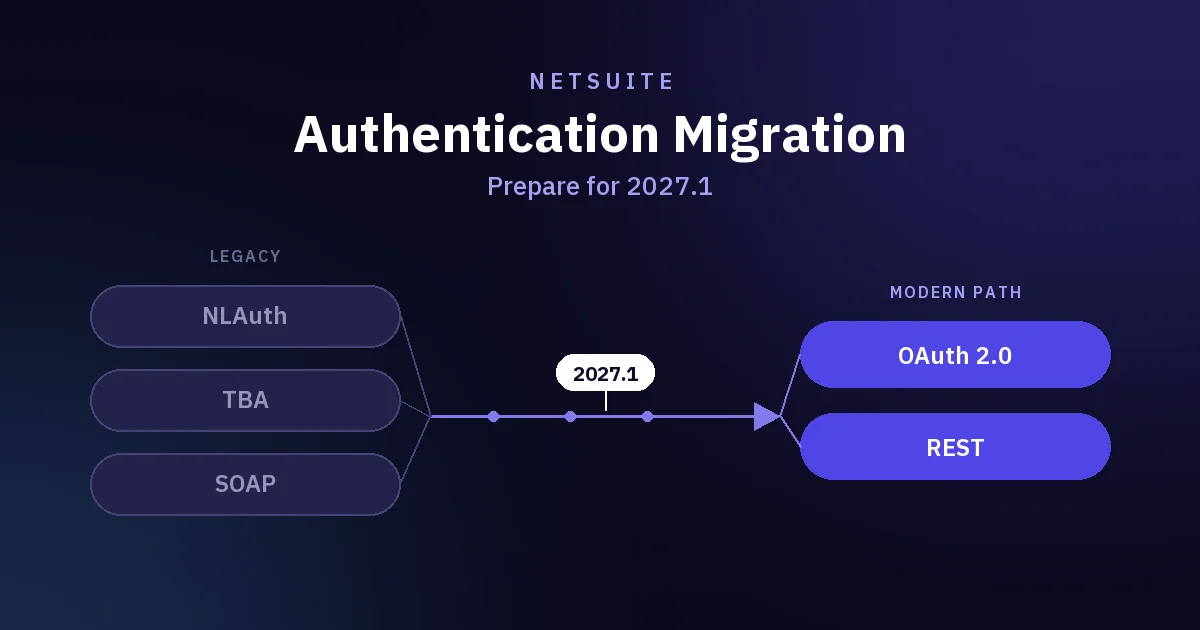
NetSuite supports both Token-Based Authentication (TBA) and OAuth 2.0 for REST web services, RESTlets and SuiteAnalytics Connect. Oracle’s own documentation states OAuth 2.0 as the preferred method, since it removes the need for an integration to store user credentials and does not require the request signing TBA does.
New integrations should default to OAuth 2.0 and authenticate through a dedicated Integration record with its own role and permissions, rather than as a named employee user. This keeps API access auditable and independent of any one person’s account.
On governance, a RESTlet script can consume up to 5,000 governance units per execution, five times the allocation most other script types such as Suitelets and User Event scripts receive. That budget is still finite, and a poorly written RESTlet, an unbounded saved search loop or a record load inside a loop, can exhaust it on a single call.
RESTlet input and output are also capped at a guaranteed 10MB, which matters for any integration moving large records, attachments or bulk data sets. Pagination or chunking needs to be designed in from the start rather than discovered in production.
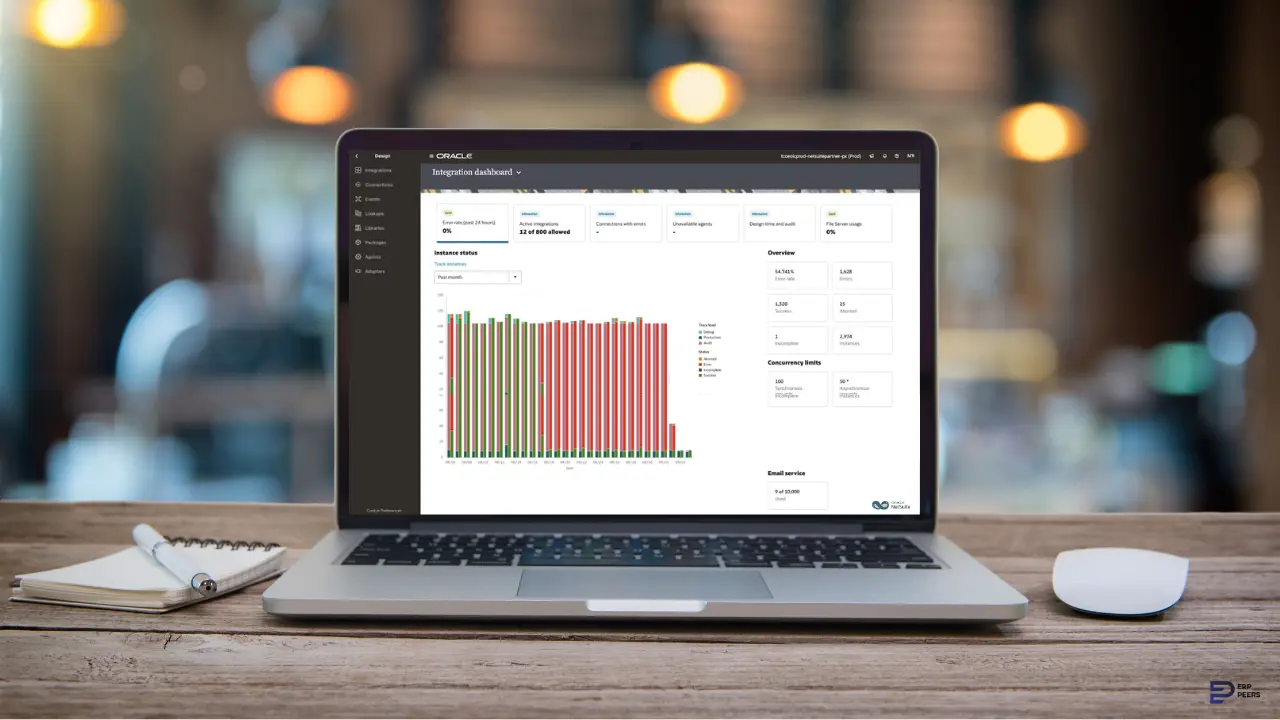
Concurrency is managed at the account level: REST web services and RESTlet requests are counted against a shared limit. A single high-frequency integration can throttle not just itself but other integrations and NetSuite UI users on the same account if it is not built with backoff and retry logic for governance and concurrency errors.
Design input, not an afterthought: treat authentication method and governance limits the same way you treat volume and latency, an explicit input to the architecture decision, not something a developer discovers the first time an integration throws a governance error in production.
Every integration eventually fails a call. What separates a production-ready integration from a fragile one is what happens next.
A production integration needs three things regardless of which platform sits underneath it.
Scale considerations differ by layer, not just by platform. Managed iPaaS and middleware platforms generally scale transaction volume more gracefully out of the box, since the underlying infrastructure is the vendor’s responsibility.
Direct builds can scale further in principle but require deliberate engineering investment to do so. And regardless of platform, NetSuite’s own governance and concurrency limits, covered above, are a hard ceiling that no amount of platform investment removes. They have to be designed around, not out of.
NetSuite ships two major platform releases a year. Oracle provides a temporary Release Preview account ahead of each one specifically so customizations and integrations can be tested against the upcoming version before it goes live.
Skipping that testing window is a common way a previously stable integration breaks with no code change of its own. It belongs in every integration’s ongoing maintenance plan, not just its initial build.
Inherited integrations bring their own set of decisions. A SOAP-based integration built years ago still works, but new development against it should generally migrate toward REST, since that is Oracle’s stated direction and where new platform investment is focused.
Before extending, rebuilding, or replacing an inherited integration, audit what it actually does today, not what its documentation claims, what business processes depend on it, and whether its failures are visible or silent. The same audit-before-rebuild discipline covered in the integration-recovery scenario above.
Actual pricing varies too much by scope, transaction volume and vendor terms to state a specific number here responsibly, and this guide will not invent one.
What can be said directionally: managed platforms, iPaaS, ESB, ETL, all carry ongoing licensing cost in addition to implementation effort, in exchange for faster initial build time and reduced custom maintenance burden. A direct build removes platform licensing but shifts the entire cost into engineering time, both for the initial build and for every future change, error and edge case.
Enterprise middleware generally carries more complexity and platform overhead than a NetSuite-focused iPaaS for a NetSuite-specific need, which is part of why it fits best when NetSuite is one connection inside a much larger existing integration landscape. If you need real cost figures for your specific scenario, that is a conversation for a scoping call, not something a general guide can responsibly estimate.
Everything above is the buyer’s real decision, independent of any one vendor.
Where ERP Peers fits is specific: we are a Certified Celigo Partner and NetSuite consulting firm. Our delivery experience covers direct API builds, RESTlet-based custom development, and NetSuite-side integration architecture generally, including Boomi and MuleSoft-based integration work where a project calls for it.
If you are working through this decision for a real project, our NetSuite consulting team can help scope the right architecture before any build starts.
If you are heading toward a go-live date, our NetSuite Go-Live Readiness Checklist covers integration readiness alongside the other 13 gates that determine whether launch is a good decision.
Working through a specific integration decision right now? Get in touch with our team.
Our customer support team is available for help.
Need help with NetSuite?
Chat with our team.