


Get In Touch
Our customer support team is available for help.
NetSuite Implementation

Most “go-live checklists” are lists of tasks to tick off. They tell you what to do. They rarely tell you what actually determines whether launching this week is a good decision or a bad one, and they almost never give a project owner, CFO, or steering committee a defensible way to say Go, Conditional Go, or No-Go and explain exactly why.
This is a decision framework, not a task list. It is built around 14 readiness gates. Each gate states what must actually be true, the evidence that proves it, who owns it, the warning signs that it isn’t real, and the specific condition that triggers a Go, a Conditional Go, or a No-Go. It is meant to be used in the room, during the actual go-live decision meeting, not read once and filed away.
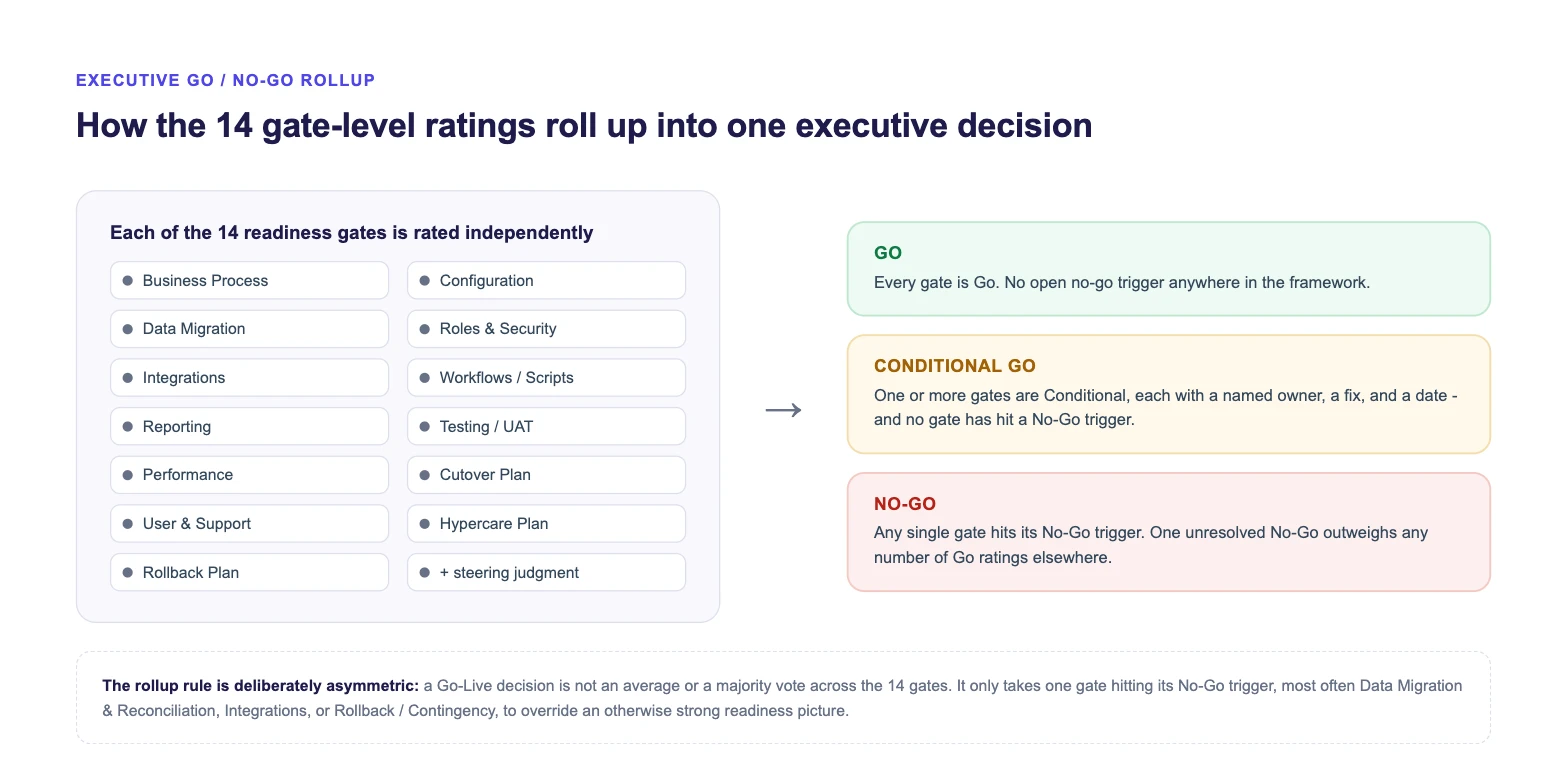
Quick answer: A NetSuite go-live is ready when all 14 readiness gates below, from business process and data reconciliation through integrations, testing, cutover planning and rollback, are rated Go or Conditional Go with a named owner and fix date, and no gate has hit its No-Go trigger. One unresolved No-Go, most often in Data Migration, Integrations, or Rollback, outweighs strong readiness everywhere else.
A NetSuite go-live decision is not one question. It is 14 smaller decisions, made across process, data, security, integrations, automation, reporting, testing, performance, cutover, people, hypercare and contingency, that get rolled up into one call. Treating it as a single yes/no question is exactly how teams end up going live with strong configuration and untested data reconciliation, or clean UAT and no rollback plan.
This matters for a specific reason: the gates are not equally forgiving. A gap in Reporting is usually recoverable in the first week. A gap in Data Migration & Reconciliation, Integrations, or Rollback / Contingency is much harder to walk back once transactions start flowing in production. The framework below treats them accordingly.
Work through the 14 gates below with the actual gate owners, not just the project manager summarizing on their behalf. For each gate, agree on one rating: Go, Conditional Go, or No-Go. A Conditional Go is only valid if it comes with a named owner and a fix date, otherwise it is a No-Go wearing a softer label. Bring all 14 ratings into one steering committee meeting (Gate 14) and apply the rollup rule below.
Working Through A Real Go-Live
Get a second set of eyes on your readiness gates
ERP Peers reviews go-live readiness for NetSuite implementations in progress, including integration and hypercare readiness, and helps steering committees make a defensible Go / Conditional Go / No-Go call before launch, not after.
Each gate below follows the same structure: what must be true, the evidence that proves it (not just an assertion), who owns it, the warning signs that it isn’t real yet, and the specific Go / Conditional Go / No-Go trigger.
| Gate | Owner | Go Trigger (in one line) |
|---|---|---|
| 1. Business Process Readiness | Business Process Owners | Every core process run end-to-end and signed off |
| 2. Configuration & Customization | Solution Architect | Config matches signed-off requirements, every customization owned |
| 3. Data Migration & Reconciliation | Data Lead + Controller | Final load reconciles to source control totals |
| 4. Roles, Permissions & Security | IT / Security Lead | Roles tested as real roles, SoD conflicts resolved |
| 5. Integrations | Integration Architect | Every integration tested end-to-end on production credentials |
| 6. Workflows / SuiteScript / Automation | SuiteCloud Developer | Scripts tested at realistic volume with error handling |
| 7. Reporting & Financial Outputs | Finance / Ops Owners | Reports reconcile to legacy figures, reviewed by real users |
| 8. Testing / UAT / Regression | QA / Test Lead | UAT complete by real users, clean regression pass |
| 9. Performance / Governance | Technical Lead | Validated under realistic concurrent load and volume |
| 10. Cutover Planning | Project Manager | Runbook complete, freeze window enforced, sequence rehearsed |
| 11. User & Support Readiness | Training Lead | Role-based training done, escalation path published |
| 12. Hypercare / Monitoring | PM + Technical Lead | Staffing, monitoring and exit criteria all defined |
| 13. Rollback / Contingency | Executive Sponsor + PM | Plan documented, walked through, authority clear |
| 14. Executive Go / No-Go Decision | Steering Committee | All gates reviewed together, one documented decision |
What Must Be True
End-to-end business processes, order-to-cash, procure-to-pay, record-to-report, have been walked through inside NetSuite by the people who will actually run them, not just configured and demoed by the implementation team.
Evidence To Verify
Owner
Business Process OwnersWarning Signs
GoEvery core process has been run end-to-end with real transaction types and signed off by its owner.
Conditional GoHappy-path processes are verified; a small number of low-frequency exceptions have a documented interim workaround and owner.
No-GoA core daily process, order fulfillment, invoicing, has not been run end-to-end by the team who will run it live.
What Must Be True
Configuration matches the final, signed-off business requirements, and every customization, custom field, form, record, script, has a documented purpose and an owner, not just a build ticket.
Evidence To Verify
Owner
Solution Architect / Functional LeadWarning Signs
GoConfiguration matches signed-off requirements; every customization has a documented purpose and owner.
Conditional GoMinor configuration gaps exist, are low-impact, and have a fix scheduled within hypercare.
No-GoCore configuration diverges from what was tested, or a customization touching financial data has no owner.
What Must Be True
Migrated data reconciles to source-system control totals, not just record counts, and opening balances tie out to what Finance expects.
Evidence To Verify
Owner
Data Migration Lead + Controller Sign-OffWarning Signs
GoThe final data load reconciles to source control totals and Finance has signed off on opening balances.
Conditional GoFinancial data reconciles; a small number of non-financial gaps (old notes, historical attachments) are documented and accepted.
No-GoOpening GL balances, AR/AP aging, or inventory valuation do not reconcile to source, or reconciliation has not happened at all.
What Must Be True
Roles reflect least-privilege access aligned to actual job functions, and segregation-of-duties conflicts, especially around approvals and payments, have been reviewed.
Evidence To Verify
Owner
IT / Security LeadWarning Signs
GoRoles match job functions, have been tested as each role, and SoD conflicts are resolved or formally accepted.
Conditional GoRoles are largely correct; a small number of edge-case users have temporary elevated access with an expiry date and owner.
No-GoFinancial approval roles have unresolved SoD conflicts, or end users have never logged in and worked under their real role.
What Must Be True
Every integration in scope has been tested as a full chain, source system to NetSuite to any downstream system, not tested in isolation, and points to production credentials and endpoints, not sandbox ones.
Evidence To Verify
Owner
Integration Architect / Technical LeadWarning Signs
GoEvery integration is tested end-to-end on production credentials, with monitoring, alerting and a named failure owner.
Conditional GoIntegrations touching financial or order data are fully tested; lower-priority integrations have a documented go-live-plus-N date.
No-GoA financially significant integration has not been tested end-to-end, or no one owns responding to integration failures.
What Must Be True
Custom scripts and workflows have been tested under realistic data volume and concurrency, not only against single test records, with visible error handling and logging.
Evidence To Verify
Owner
SuiteCloud Developer / Technical LeadWarning Signs
GoAll scripts and workflows are tested at realistic volume, with confirmed error handling and logging.
Conditional GoCore scripts are proven at volume; a small number of lower-impact automations are monitored in hypercare by a named owner.
No-GoA script touching financial transactions has not been tested beyond a single record, or failures fail silently.
What Must Be True
Business-critical reports and saved searches produce numbers that reconcile to what Finance and Operations expect, checked against the legacy system’s known-good output for a recent period.
Evidence To Verify
Owner
Finance / Operations Report OwnersWarning Signs
GoBusiness-critical reports reconcile to legacy figures and have been reviewed by their actual users.
Conditional GoCore financial reports reconcile; a few operational reports have known gaps with a documented interim process.
No-GoA report Finance depends on for close, AR aging, trial balance, does not reconcile to legacy data.
What Must Be True
UAT was performed by actual end users using realistic, day-in-the-life scenarios, kept clearly separate from end-user training, with sign-off recorded per scenario, followed by a regression pass after any late configuration change. Teams without an existing script set can start from a NetSuite UAT test case library rather than building scenarios from scratch.
Evidence To Verify
Owner
QA / Test LeadWarning Signs
GoUAT is complete, performed by real end users, signed off, with a clean regression pass after final changes.
Conditional GoUAT is substantially complete; a small number of low-severity defects are logged with an owner and fix date.
No-GoUAT was not performed by actual end users, or a core process has an unresolved defect discovered during UAT.
What Must Be True
The system has been tested under realistic concurrent user load and data volume, not only individual transaction testing, with attention to SuiteScript governance limits at peak usage.
Evidence To Verify
Owner
Technical Lead / NetSuite AdministratorWarning Signs
GoPerformance is validated under realistic concurrent load and data volume, with no governance concerns at peak.
Conditional GoPerformance is acceptable under tested conditions; peak-period behavior is monitored closely in hypercare.
No-GoNo performance testing beyond single-user testing exists for a high-concurrency process such as order entry.
What Must Be True
A detailed, time-boxed cutover runbook exists with a clear data-freeze window on the legacy system, named task owners, and a defined point of no return.
Evidence To Verify
Owner
Project Manager / Cutover LeadWarning Signs
GoThe cutover runbook is complete, the freeze window is enforced, and the sequence has been rehearsed.
Conditional GoThe cutover plan is complete and communicated; a full rehearsal has not happened but each step has been validated separately.
No-GoNo documented freeze window exists, or no one has walked through the actual cutover sequence step by step.
What Must Be True
End users have been trained on their actual role-based workflows, kept separate from UAT, and know exactly where to get help on day one.
Evidence To Verify
Owner
Training Lead / Change ManagementWarning Signs
GoRole-based training is complete close to the go-live date, and the support escalation path is published and understood.
Conditional GoTraining is complete; the escalation path exists but has not been widely communicated yet, with a plan to do so before go-live.
No-GoNo role-based training has occurred, or there is no defined go-live-week support escalation path.
What Must Be True
A defined hypercare period exists with dedicated resources, clear exit criteria, not just a calendar date, and active monitoring rather than an assumption that “someone will be around.”
Evidence To Verify
Owner
Project Manager + Technical LeadWarning Signs
GoHypercare staffing, monitoring and exit criteria are all defined and resourced.
Conditional GoThe hypercare plan exists with a staffing gap in a low-risk area, such as one on-call reporting resource rather than dedicated coverage.
No-GoNo hypercare plan exists, or nobody is assigned to actively monitor integrations and scripts immediately after go-live.
Go-live day is not the finish line. The real test of readiness is the first clean month-end close on the new system: reports that reconcile, no manual workarounds nobody documented, and no urgent fire drill traced back to something this framework should have caught. Treat the first close, not launch day, as the actual measure of a successful go-live.
What Must Be True
A contingency plan exists that distinguishes what is realistically possible at different points after go-live: a full rollback to the legacy system, which most projects find is only genuinely viable in a limited early window before live transaction activity accumulates (the exact window varies by project; treat this as practitioner guidance, not a fixed rule), and a partial, targeted contingency for later on, isolating the specific broken process, integration, or module and using a temporary, controlled workaround while preserving data integrity and clear ownership.
Evidence To Verify
Owner
Executive Sponsor + Project ManagerWarning Signs
GoA contingency plan covers both the early-window full-rollback option and a later-stage partial-contingency approach, walked through with the execution team, with clear decision authority for each.
Conditional GoThe early-window full-rollback plan and decision authority are clear; the later-stage partial-contingency approach is understood in principle but not yet formally documented.
No-GoNo contingency plan exists for either scenario, or legacy-system data is no longer preserved in a state that makes even the early-window rollback realistic.
What Must Be True
The steering committee reviews all 13 prior gates together, in one meeting, not department by department in isolation, and makes one explicit, documented decision.
Evidence To Verify
Owner
Executive Sponsor / Steering CommitteeWarning Signs
GoAll 13 gates are rated Go and the steering committee formally signs off.
Conditional GoOne or more gates are Conditional, each with a named owner, fix and date, and the committee explicitly accepts the residual risk.
No-GoAny gate is rated No-Go and its trigger condition remains true at the time of the decision meeting.
These patterns show up repeatedly across NetSuite go-lives, independent of company size or industry. None of them are exotic. They are ordinary gaps that pass unnoticed because no one was explicitly checking for them.
Integration failures are disproportionately represented in rocky go-lives, not because integrations are inherently fragile, but because they are the one readiness area that requires two or more systems, and often two or more teams, to be correct and coordinated at the same moment. A handful of areas deserve specific attention beyond the general Integrations gate above:
For a deeper breakdown of integration architecture patterns, authentication and API governance limits, and reconciliation design across methods like SuiteTalk, RESTlets, iPaaS platforms and EDI, see our NetSuite Integration Architecture guide.
This framework is built to be used with or without ERP Peers. Most teams that use it are running their own go-live, with an internal team, an implementation partner, or both, and want a structured way to have the readiness conversation.
Where we do get involved is usually one of a few specific gaps: reviewing integration readiness before a go-live where the internal team doesn’t have deep integration experience, supporting hypercare and post-go-live monitoring so issues get caught and owned instead of drifting, and helping resolve the specific gate that’s genuinely blocking a decision, whether that’s data reconciliation, permissions and security, or a workflow that hasn’t been proven at volume.
We’ve supported similar readiness and post-go-live work on real NetSuite projects, including go-live support and optimization for a heavy equipment manufacturer, a multi-entity food company’s migration and integration, and an Amazon Vendor Central EDI integration for a multi-channel business.
If a specific gate is genuinely uncertain on your project, whether that’s integration readiness, a customization that needs review, or building out a hypercare plan, talk it through with our team. There’s no obligation attached to the conversation.
Our customer support team is available for help.
Need help with NetSuite?
Chat with our team.