Landed cost is the total price a business pays to get a product to its final destination. This includes the product cost, shipping fees, customs duties, taxes, and insurance. Managing landed costs correctly helps businesses set accurate prices, calculate real profit margins, and avoid financial surprises.NetSuite helps you manage landed costs easily. It offers tools to track all costs related to bringing a product into your inventory. In this guide, we’ll walk you through everything you need to know about setting up and managing landed costs in NetSuite.Why Are Landed Costs Important for Your Business?
Landed costs affect several key areas of your business:- Accurate Pricing: To set the right price, you need to know your total cost. Including landed costs ensures your pricing is accurate.
- Profit Margins: Without accounting for landed costs, you might miss out on important expenses, making your profit margins appear higher than they are.
- Inventory Valuation: Landed costs are included in your inventory’s value. Incorrect cost tracking leads to inaccurate financial reporting.
Poorly managed landed costs can lead to tax compliance issues, as inaccurate inventory valuation affects tax filings and audits. NetSuite’s automation ensures proper cost allocation, reducing compliance risks.Without proper management, businesses risk losing money due to miscalculated costs or underpriced products. NetSuite helps you get accurate, real-time data on these costs to make informed decisions.Understanding NetSuite’s Landed Cost Feature
NetSuite’s Landed Cost feature automates the allocation of extra costs, such as freight, taxes, and customs, directly to inventory items. This ensures a precise total cost calculation for every product.Key Features of NetSuite’s Landed Cost Module
| Feature | Description |
|---|
| Accurate COGS Calculation | Ensures all costs are distributed correctly across inventory items. |
| Seamless System Integration | |
| Multi-Location Costing Support | Helps businesses allocate costs accurately across different warehouses or regions. |
| Flexible Cost Allocation Methods | Allows for cost distribution based on weight, volume, quantity, or value. |
Landed Cost Allocation Methods
| Allocation Method | When to Use | Example Scenario |
|---|
| Weight-Based | Heavy items incur higher shipping costs | Importing metals or machinery |
| Volume-Based | Bulkier items take more space in a container | Furniture, large electronics |
| Quantity-Based | Flat-rate shipping costs per unit | Books, small accessories |
| Value-Based | Higher-cost items should absorb more costs | Jewelry, high-end fashion |
With these features, businesses can ensure complete cost visibility and more accurate financial management.Step-by-Step Process of Setting Up Landed Costs in NetSuite
1. Activating the Landed Cost Feature
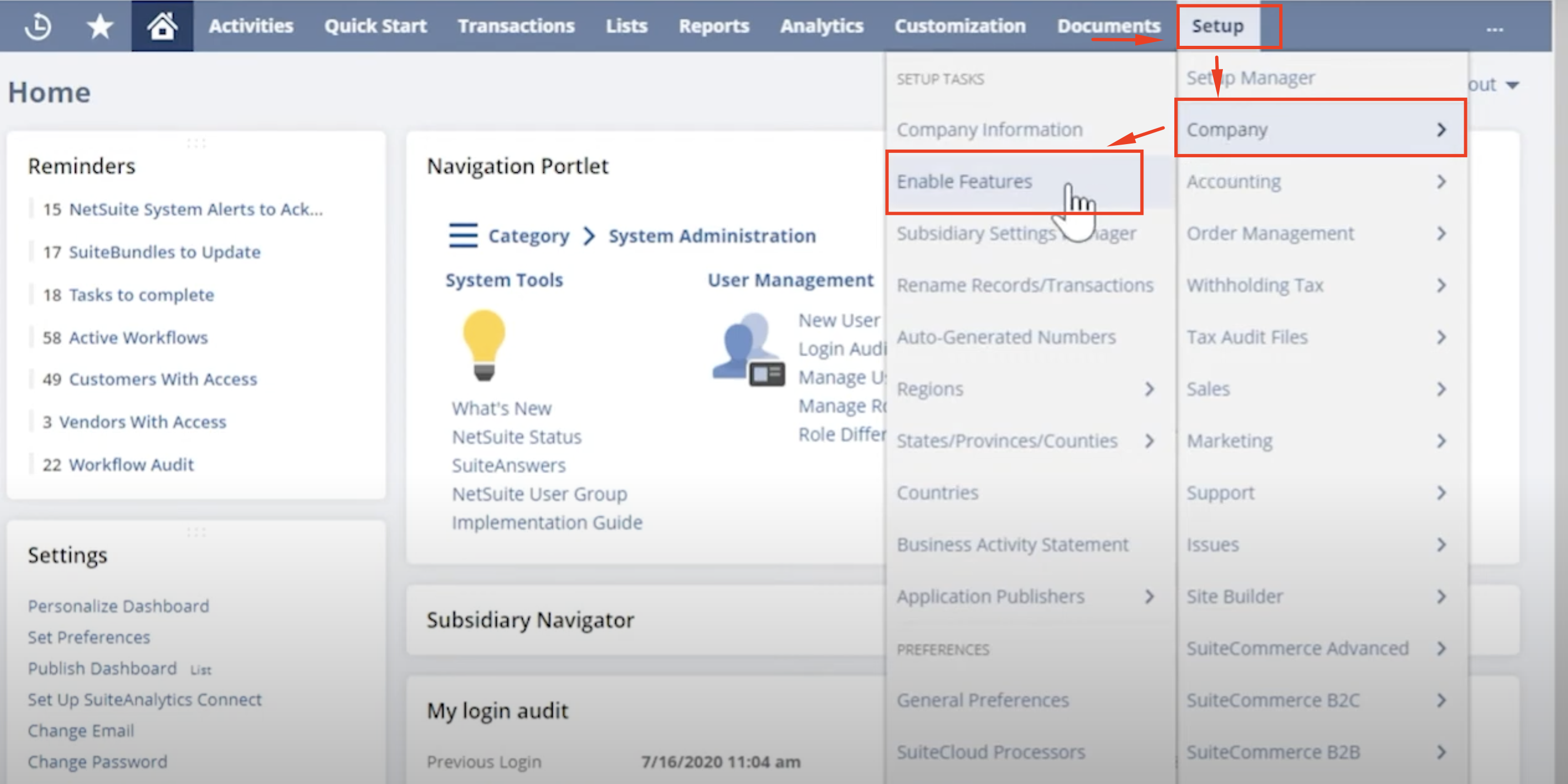
To begin using landed costs in NetSuite, you must first enable the feature. Here’s how to do it:- From the Setup menu, navigate to Company.
- Select Setup Tasks and then click on Enable Features.

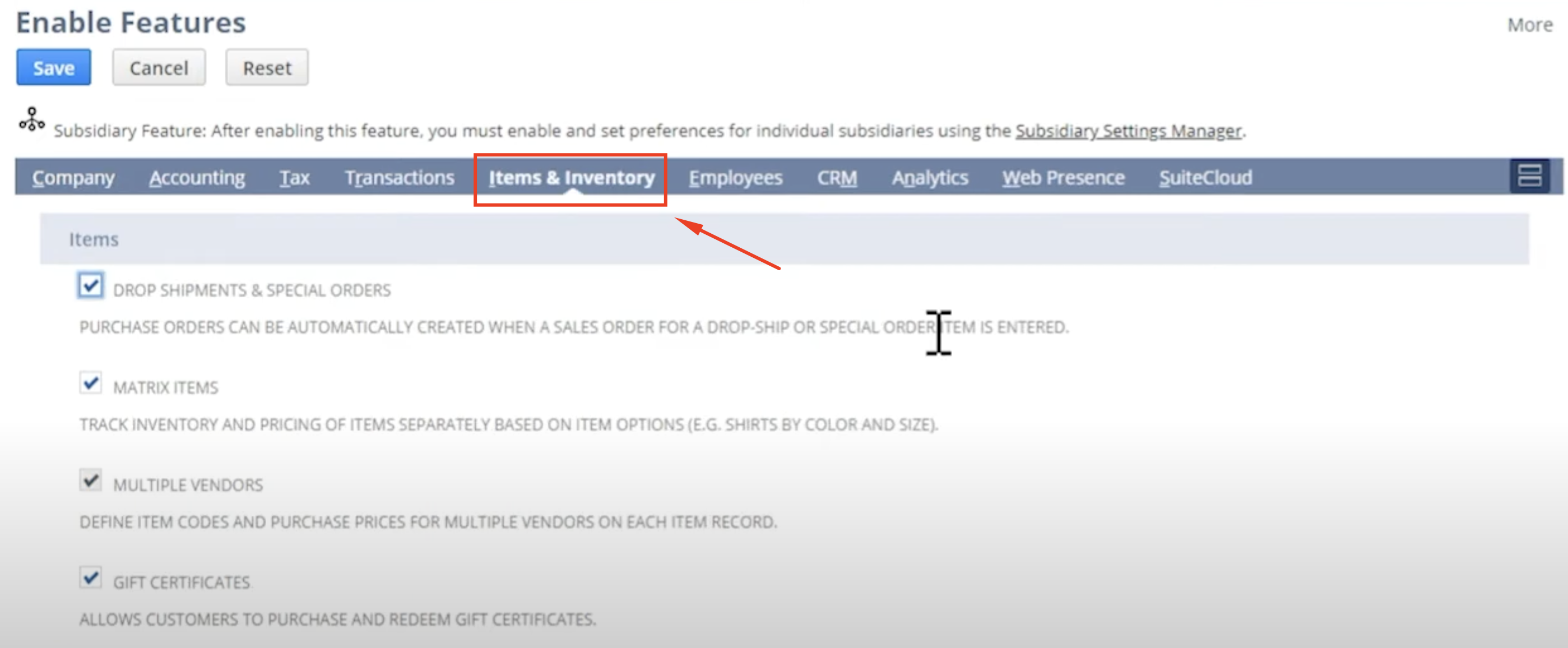
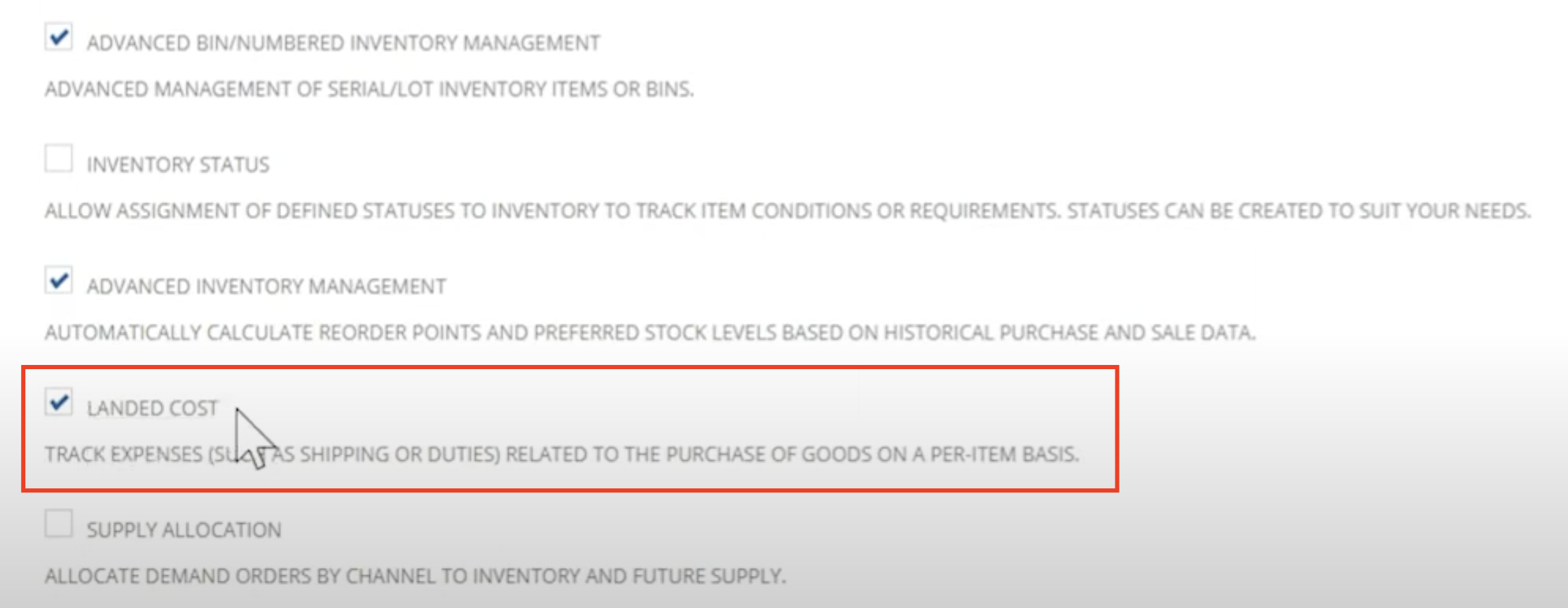
- Under the Inventory subtab, find the Landed Cost section.
- Check the box next to Landed Cost to activate it.
- Hit Save to complete the process.
2. Setting Up Landed Cost Categories
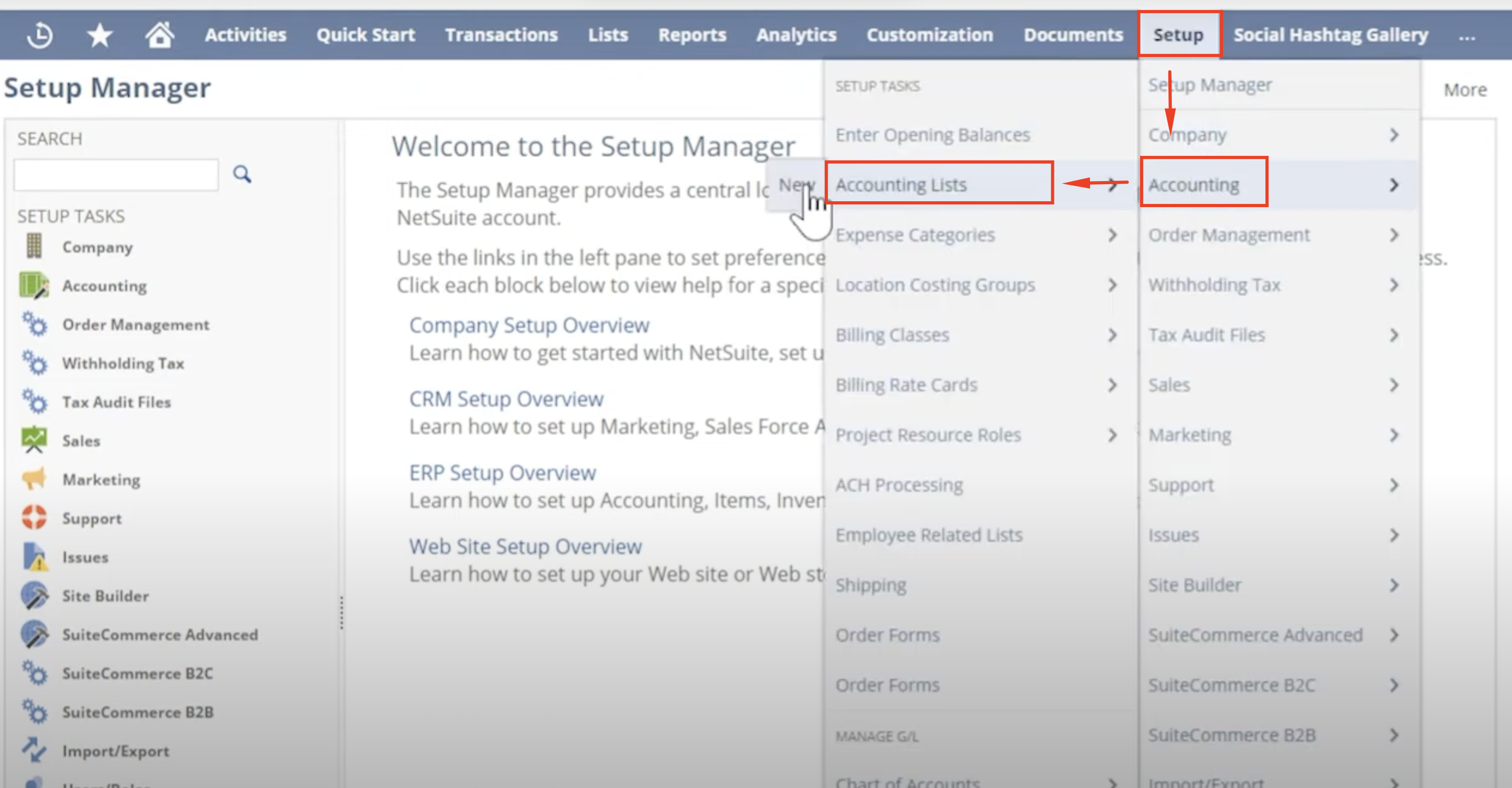
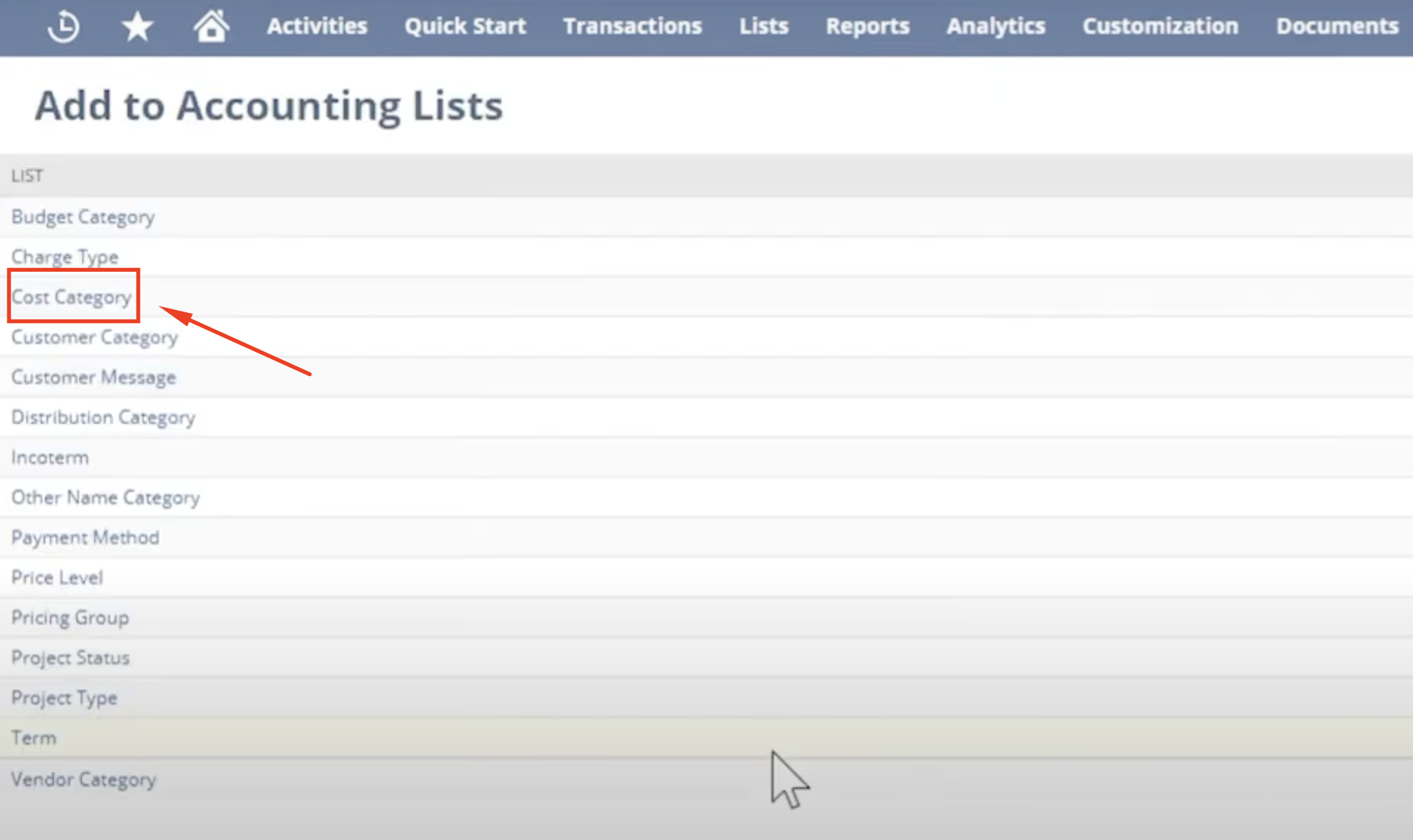
Next, you’ll need to create categories for your landed costs (e.g., shipping, taxes, customs duties). Here’s how you can configure them:- Navigate to Setup > Accounting > Setup Tasks.
- Click on Accounting Lists and then New.
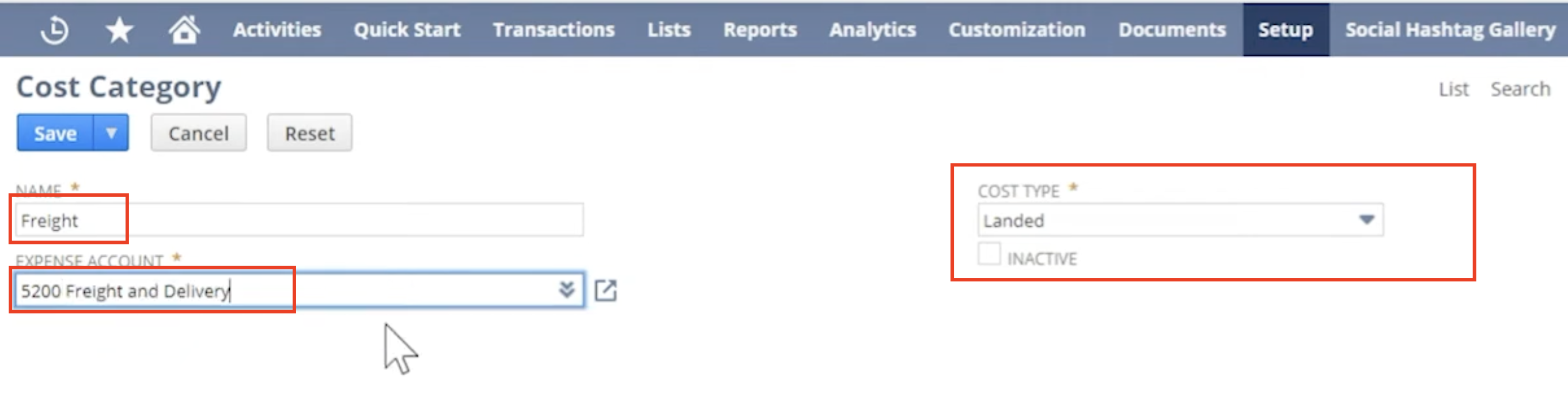
- In cost type click Landed.
- Choose an Expense Account that will track the landed cost for each category.
- Enter a name for the new category (e.g., shipping, duties).
- Click Save to complete the setup.
3. Configuring Item Records for Landed Costs
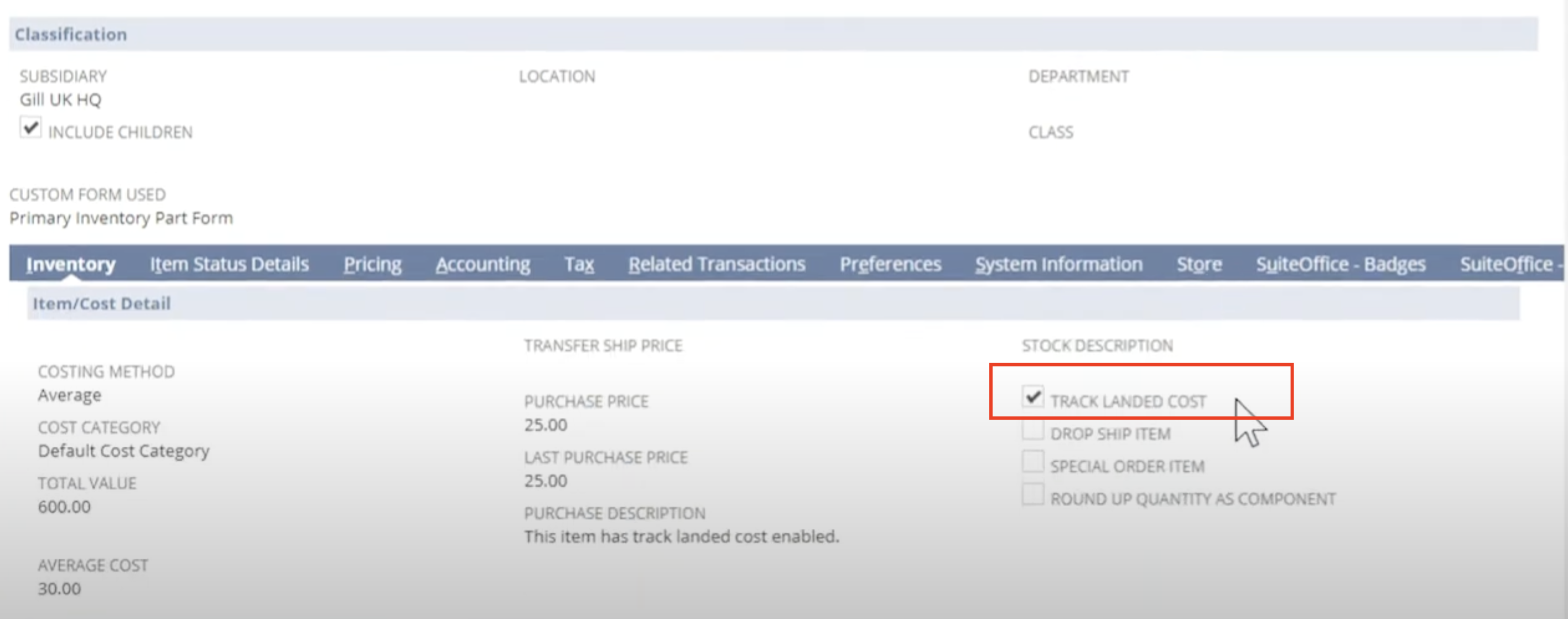
Finally, ensure that your item records are set to track and apply landed costs. Here’s how to do this:- Go to Lists > Accounting > Items and select the item you want to modify.
- In the item record, check the box to Track Landed Costs.
- Save the changes.
Landed Costs for International Transactions
Managing landed costs for international shipments can be tricky. You need to account for things like currency conversions, customs duties, and taxes, which vary by country. NetSuite helps simplify these processes.Businesses engaged in global trade must account for additional landed costs, including:- Import Duties & Tariffs: Country-specific charges on imported goods.
- Currency Exchange Fees: Additional costs due to currency conversion rates.
- Customs Brokerage Fees: Payments to customs brokers for handling paperwork and compliance.
- International Freight Charges: Additional costs for cross-border shipping and freight handling.
NetSuite enables businesses to track these expenses and allocate them efficiently, ensuring compliance with international trade regulations and accurate financial reporting.Using Estimated Landed Costs in NetSuite
NetSuite allows you to estimate landed costs before goods arrive. This can help you plan ahead and budget for future expenses. You can create templates for recurring landed costs, like shipping and customs, so you’re prepared even before the product is received.Once the goods are received, you can compare the actual costs with the estimates to make sure everything aligns. If there are discrepancies, you can adjust accordingly.Here’s how to make the most of this feature:
1. Plan Ahead with Estimates
NetSuite allows you to input estimated costs for items like shipping, customs, duties, or taxes even before the goods arrive. This gives you a clearer picture of your total expenses and helps avoid unexpected financial surprises.
- Use historical data or vendor quotes to estimate costs for specific shipments.
- Apply these estimates to Purchase Orders, so they’re accounted for during the procurement process.
2. Save Time with Landed Cost Templates
For recurring expenses like shipping or customs, NetSuite lets you create templates to simplify the process. Templates ensure consistency and save time by automatically applying common landed costs to new transactions.
- Create templates for fixed or frequently occurring costs (e.g., $200 shipping per container).
- Apply templates directly when creating purchase orders or item receipts.
3. Reconcile Estimates with Actual Costs
When the goods arrive, you can compare your estimates with the actual costs incurred. NetSuite allows you to adjust and reconcile these costs easily:
- Review the Landed Cost Reconciliation Report to see discrepancies between estimated and actual costs.
- Adjust any differences directly in the system to ensure your inventory values and expense tracking are accurate.
Challenges in Managing Landed Costs and How NetSuite Solves Them
Managing landed costs can be challenging. Here are a few common issues businesses face and their solution with NetSuite:| Challenge | Impact | NetSuite Solution |
|---|
| Complex Calculations | Costs involve multiple factors, making tracking difficult | Automated landed cost allocation |
| Manual Entry Errors | Incorrect allocations lead to reporting discrepancies | Predefined cost categories and templates |
| Inaccurate Financial Statements | Misallocated costs distort financial reports and tax filings | Real-time tracking and audit trails |
NetSuite solves these issues by automating cost allocation and integrating with your procurement and financial systems. This reduces the risk of errors and ensures accurate reporting.Benefits of Managing Landed Costs with NetSuite
Managing landed costs with NetSuite brings several benefits to your business:- Accurate Pricing: You can set the right price by knowing the exact cost of goods.
- Better Profit Margins: By tracking all costs, you ensure accurate margins.
- Improved Financial Reporting: NetSuite integrates with your financial systems, ensuring that your reports reflect the true cost of your inventory.
- Streamlined Operations: The automation saves time and reduces manual work, helping your business run more efficiently.
Practical Tips for Effective Landed Cost Management
Here are some tips to manage landed costs effectively:- Regularly Update Categories: As your business grows or changes, make sure your landed cost categories are up to date.
- Train Your Team: Ensure your team knows how to input and allocate costs correctly to avoid errors.
- Use NetSuite’s Reporting Tools: NetSuite offers reporting tools that help you track and analyze your landed costs. Use them to optimize your processes.
Conclusion
Landed cost management is crucial for accurate financial reporting, pricing, and profit assessment. With NetSuite’s Landed Cost feature, you can easily track all associated costs, whether they’re local or international. By following this guide, you will understand your product costs better. This will help you make smarter choices and avoid expensive mistakes.